Runs and approvals
What happens during a worker run, every run state, cancellation and retries, and how approvals bind to the exact content of an email or Slack post.
On this page
A run is one execution of a worker. The run history shows every run with its status, steps, sources and result.
Run states#
| State | Meaning |
|---|---|
| Queued | Waiting to start. |
| Running | Working now. |
| Waiting for approval | Paused on an outside action you need to approve. |
| Retrying | A temporary failure; it will try again shortly. |
| Cancel requested | You asked it to stop; it stops after the current step. |
| Completed | Finished, with its result. |
| Failed | Finished with an error — for example an expired credential. |
| Cancelled | Stopped at your request. |
Runs continue safely through restarts: progress is saved as the run goes, so an interrupted run resumes instead of repeating work.
Cancelling#
Cancel a queued or running run at any time. If it is mid-way through a call to an outside service, the cancellation takes effect after that step — Ysra never pretends an in-flight request wasn't sent.
Retries#
Temporary failures — a timeout, a busy service — are retried a limited number of times with increasing delays, following the worker's retry settings. Problems that retrying can't fix, such as a revoked credential, fail the run with a clear reason.
Approvals#
When a worker wants to act outside Ysra — send an email, post to Slack — the run pauses and shows the exact proposal:
- Approve — that exact content is sent, once.
- Reject — nothing is sent.
An approval is bound to the precise content. If anything about the message changed, it would be a different proposal needing a new approval.
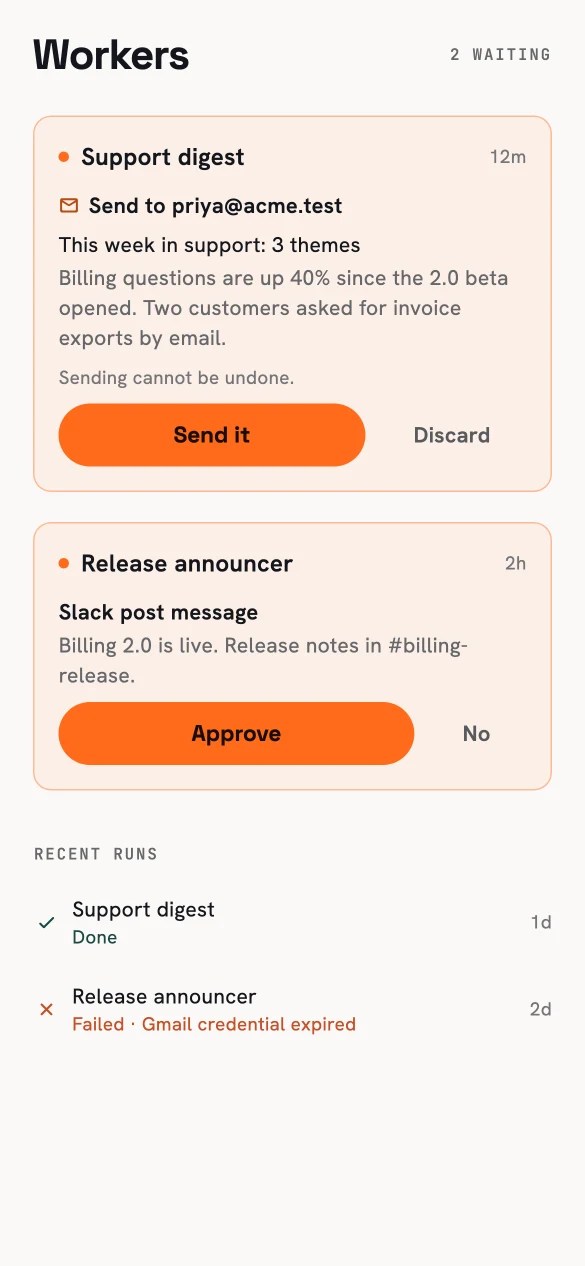
Approve or reject from your phone.
Never sent twice#
Just before an approved action is sent, it is marked as being sent. If the worker crashed at that exact moment, the action is held for checking rather than sent again automatically — so a crash can't produce a duplicate email or message.
Where to see runs#
- Portal → Workers — every worker, its runs, filters, and a detailed view of each run tailored to its kind: steps and proposals for general workers, sources for research, draft and send status for mail, observations and transitions for uptime.
- Phone → Workers — what's waiting for your approval, and recent runs. The phone checks for updates only while runs are active, so an idle account stays quiet.