Actions and approvals
Approve, edit or reject the Slack messages, Jira changes, emails and other actions Ysra proposes in Ask — nothing happens until you approve the exact action.
On this page
An action proposal is a card in an Ask answer showing exactly what Ysra would send or change outside Ysra: a Slack message, a Jira change, or a change in a service you connected in Plugins, such as an email from Microsoft 365. Ysra never makes the change on its own; it runs only when you approve that exact action. This page covers what can be proposed, what each button does, and what each card needs; routines have their own approvals.
How approval works#
Approving the card is the permission. Each approval runs the action once, exactly as shown; editing a proposal makes it wait for your approval again.
States of a proposal#
| State | What it means | What moves it on |
|---|---|---|
| Proposed | The card shows exactly what would happen. Nothing has run. | Approve, Edit, or Reject / Decline |
| Edited | You changed the content; it waits again. | Approve or Reject / Decline |
| Done | It ran once, through your connection. The card folds to one line saying what happened. | — |
| Rejected / Declined | Nothing ran. The card folds the same way. | — |
| Failed | It was approved but didn’t go through. The card folds the same way. | Ask again |
Slack and Jira proposals#
| Card | What it does after approval |
|---|---|
| “Send Slack message” | Posts the message in Slack. |
| “Create Jira issue” | Creates a new issue. |
| “Update Jira issue” | Changes fields on an existing issue. |
| “Add Jira comment” | Adds a comment to an issue. |
| “Move Jira issue” | Moves an issue to another status. |
| Button | What happens |
|---|---|
| Approve exact action | The action runs through your connection, exactly as shown on the card. |
| Edit | Change the content, then choose Save proposal. The changed proposal waits for your approval again. |
| Reject | Nothing runs. |
After you approve a Jira action, the card links to the result with Open in
Jira. You can also start a proposal with a slash command such as /slack
send or /jira create. See Ask.
Changes in a connected service#
A service connected in Settings → Connectors works the same way. A tool that sends or changes something never runs during the answer: it becomes a card under the answer that proposed it.
| Part of the card | What it shows |
|---|---|
| The title | What and where, for example Send mail · Microsoft 365. |
| The details | One per line: who it goes to, the subject, and so on. A long text, such as the email itself, is shown as it will read, shortened to a few lines, with Show all. |
| Attachments | Files, with their names and sizes. They come from this chat. |
| Buttons | Approve, Edit and Decline stay in view. |
| Button | What happens |
|---|---|
| Approve | The change runs once, exactly as shown. |
| Edit | Change the details, then choose Keep changes. You can remove attachments, but not add others. |
| Decline | Nothing runs. |
Once decided, the card folds to one line, such as Sent to sam@example.com with 1 attachment (report.pdf)., with Show to see what was sent.
Ask always asks, whatever the service’s Allow changes in Code switch says.
What each proposal needs#
| To propose | The colleague needs | Notes |
|---|---|---|
| Slack messages | Slack messages | Sent only after you approve its exact text. See Slack. |
| Jira changes | Jira changes | Issues only. |
| Changes in a connected service | MCP servers | The built-in Ysra has it. A colleague shared with other people reaches only the servers shared with your team, and a public colleague reaches none. |
See Colleagues.
What Ysra never changes in Jira#
The Jira actions above are limited to issues: creating, updating, commenting and moving them. Ysra never changes projects, boards, workflows or permission schemes.
On the phone#
Proposals appear in the answer with Approve, Edit and No. They work the same way: nothing happens until you approve.
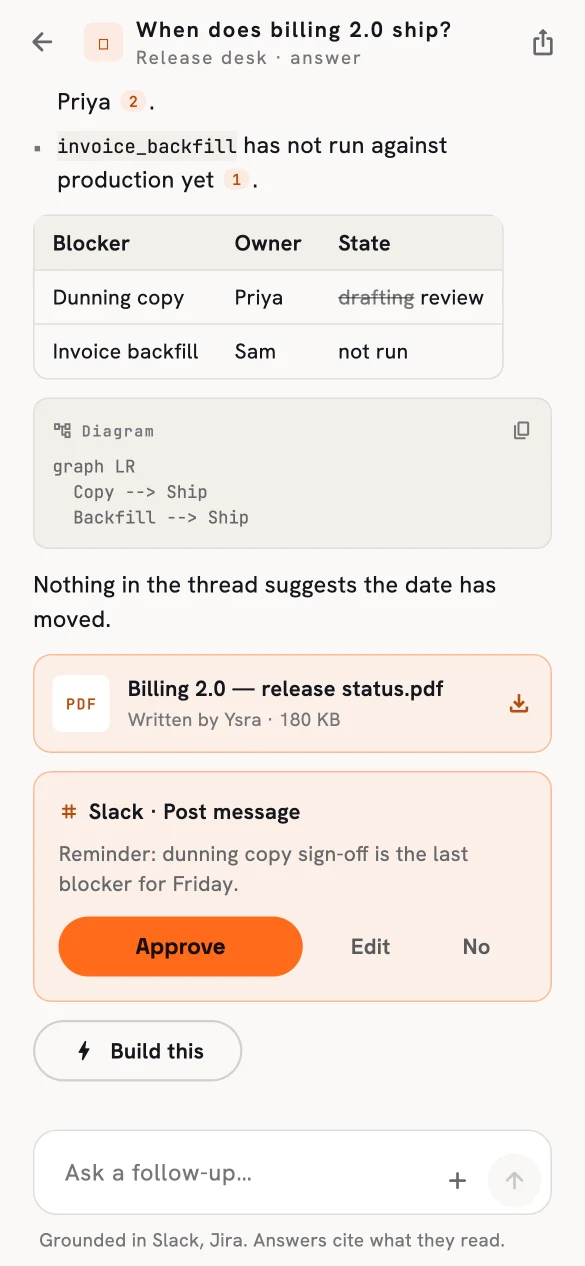
A proposed Slack message, waiting for approval.
Actions in routines#
Routines have their own approvals. Sending mail and posting a chat message stop for your approval of the exact text, every time; an approval not given within 7 days expires. Routines have no Jira actions. See How routines work.
If no proposal appears#
| Why | What to do |
|---|---|
| The colleague doesn’t have the matching capability. | Turn it on in the colleague’s Capabilities, or ask the built-in Ysra. |
| Slack, Jira or the service isn’t connected, or needs reconnecting. | Connect it in Integrations or Plugins. |
| You are asking a public colleague. | Public colleagues never propose actions. |
Related#
- Colleagues — the capabilities that allow each kind of proposal.
- Plugins, connectors and skills — connecting services such as Microsoft 365.
- How routines work — approvals on a schedule.
- How Ysra finds and uses your information — why reading never means acting.