Create and use a growth plan
On this page
The growth plan turns the company profile into a focused goal, weekly work and measures you can review. It is not a promise of results and does not change your website, campaigns or connected apps without the normal approvals.
Before you start#
Complete the company name, offer, customers and website. Check that the site is publicly readable and that What the team knows about us does not contradict it. Growth research uses wallet credits.
Create the plan#
- Open Company → Growth plan and select Make the growth plan.
- Review the brief built from your profile, website and public research.
- Correct facts before continuing. A plan built on the wrong customer or offer will produce the wrong priorities.
- Choose one goal and provide the requested baseline numbers.
- Review the proposed measures and the first week's work, then confirm.
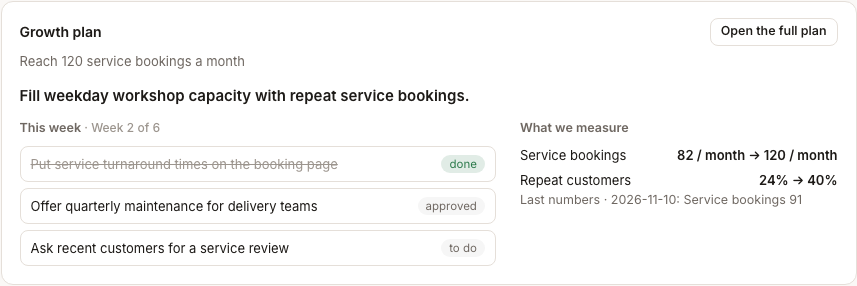
Read the weekly view#
- This week contains the small set of actions currently recommended.
- Metrics show the baseline and the values used to judge movement.
- Open the full plan shows the sequence beyond the current week.
The plan can suggest work for colleagues, but a suggestion is not an approval. External messages, publishing, purchases and connected-app changes still wait according to your controls.
Keep the plan credible#
- Update source numbers when the system that owns them changes.
- Record why you change the goal or metric; do not silently rewrite history.
- Review weekly work against capacity before assigning it.
- Stop or replace a tactic when its evidence no longer supports the goal.
Hire a suggested colleague#
Under Suited for your company, open the colleague or pack and read why it fits, which routines it brings, what it can access and what asks first. Select Hire only after you can state the responsibility it will own. Hiring never starts pack routines automatically.
Troubleshooting#
- Make the growth plan is unavailable: complete the company name or website.
- The brief is wrong: correct the profile or wiki before regenerating.
- A metric is missing: add a measurable baseline rather than an adjective.
- A suggestion does not fit: leave it unhired; suggestions are optional.
Related#
Company workspace · Company profile · Wallet, plans and limits