Credits and usage
Understand what uses credits, what is free, where to see your usage, and what happens to running work when credits run low or run out.
On this page
Credits are the one unit Ysra charges in for everything it does: answers, Code threads, cloud machines, Workers, reviews and voice. Read this page to estimate what a job costs, to follow what was used, or to understand why work paused. Plan prices and credit packs are on Plans and billing; every limit is on Limits and costs.
How credits are used#
Credits pay for what the work actually uses: the AI models it calls, and time on a cloud machine. Work pauses before a paid step it can't pay for, never in the middle of one, and nothing already done is lost.
What costs what#
| Work | What uses credits | Typical cost |
|---|---|---|
| An answer in Ask | The model reading sources and writing | Depends on the question; a deep dive reads more |
| A Code thread on your computer | The model only | Depends on the size of the change |
| A Code thread in Ysra's cloud | The model, plus the cloud machine while it runs | Machine: about 41 credits an hour (standard), about 67 an hour (large) |
| A Mayz review on its own | The model reading and checking the code | Usually 100–300 credits; stops at 300; doesn't start below 100 credits |
| A check inside a Code thread | Part of the thread | Counted in the thread's credits |
| A Worker run | The model and the tools it uses | Capped at 200 credits a run and 1,000 a Worker a day by default |
| Voice | The model listening and speaking | About 12 credits a minute (about 4 with the economy voice), billed on actual use |
| Images made in a Code task | The image model | Up to 6 images per task |
| Publish and Deploy | No fee of their own | Only the model and machine time behind them |
| A failed machine start | — | Not charged |
Free#
| What | Limit |
|---|---|
| Set up with Ysra | 3 a day |
| Help questions (Ysra help) | 20 a day |
| Uploading files and having them read | Always free; questions about them use credits as usual |
| A preview started from a thread | Never charged as a change |
| Trial credits | 500, once (see below) |
For voice minutes per plan, cloud hours, Worker caps and every other limit, see Limits and costs.
Free credits to start#
A new account gets 500 free credits once its email address is verified. Someone who joined by invitation gets them at once, because the invitation counts as verification. Until then the web app shows "Verify your email to get your 500 free credits." See Verify your email.
Free credits are given once per person: an email address that has had them doesn't get them again on a new account.
Where credits come from#
| Source | How long they last |
|---|---|
| A plan's monthly credits | Until the plan's renewal date; what's unused doesn't carry over |
| Extra credits: credit packs, an amount you choose, automatic top-ups | Until used |
| Free credits, and credits granted by Ysra | Until used |
Plan credits are used first, so extra credits last as long as possible. See Plans, Extra credits and Automatic top-ups.
An organisation's credits are shared: every member's work uses the same balance. See Who pays in an organisation.
See your usage#
| App | Where |
|---|---|
| Web app | Settings → Usage |
| Desktop app | Settings → Usage |
| Phone | Settings → Usage |
| Command line | ysra usage, or /usage in a conversation |
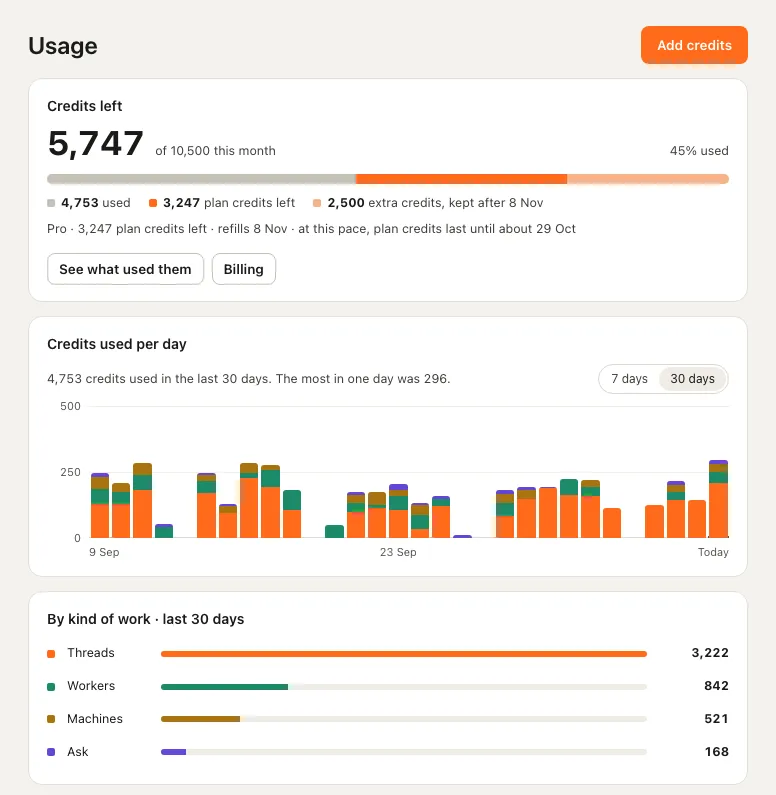
The Usage page in the web app. The figures are examples.
| Part | Shows |
|---|---|
| Credits left | The number left of this month's total, and the share used. The bar splits it into used, plan credits left and extra credits (kept after the renewal date) |
| The plan line | The plan, plan credits left and the refill date; at a steady pace, roughly when plan credits will last until |
| Credits used per day | A chart for 7 days or 30 days, each day split into Threads, Workers, Machines and Ask |
| By kind of work · last 30 days | The total for Threads, Workers, Machines and Ask |
| See what used them | What used them: each thread, Worker run, Machines run and Ask answer, with Work, When and Credits. In the web app a thread's row doesn't open it: threads live on the computer where they ran |
Add credits at the top opens the credit packs in Billing. People who don't manage billing see the same figures. In an organisation, What used them names your own Code threads; a colleague's threads appear as one line per person, with their credits and how many, never their titles.
In a thread or an answer#
| Where | What it shows |
|---|---|
| A Code thread, desktop app | What the thread has used under its title (for example "45 credits"); point at it for the total time and credits; each outcome card shows its own time |
| A thread, command line | The status bar: credits this thread and credits left |
| An Ask answer, web and desktop | The line folding Ysra's steps: time, credits and what it did, for that answer |
| An Ask answer, phone | A line with the time and steps; tap it to open them |
Time reads "40s" under a minute, "3m" under an hour, "1h 12m" after that, and runs from the start of that answer or stretch of work to its end. The line appears once the work is finished; lists don't show it.
When credits are low#
As the month's credits run low, every app shows a slim warning line: at the top of the Usage page, at the top of an open thread, and in the sidebar (on Home in the desktop app). It reads, for example, “92% of this month's credits used. 640 left; plan credits refill on 8 Nov.”
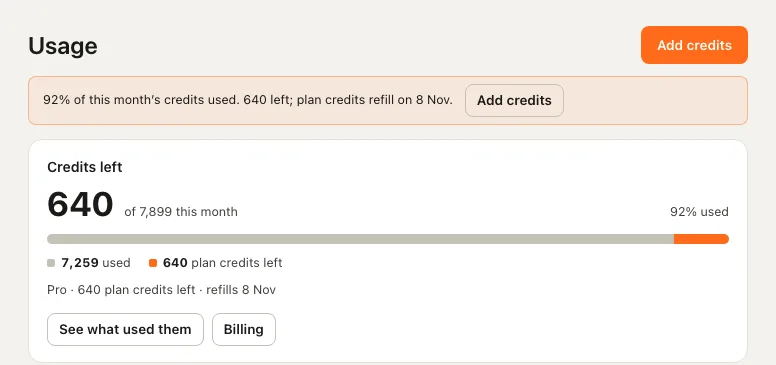
The low-credits line on the Usage page.
The web and desktop apps offer Add credits beside it, and Close until tomorrow hides it for a day; the command line adds "Add credits: ysra billing". To keep work from stopping, turn on automatic top-ups.
When credits run out#
| Situation | What happens |
|---|---|
| New paid work (a task, a Worker run, an answer, a runbook draft) | Doesn't start: "The credits ran out. Add credits, or wait for the plan's monthly refill." |
| A Code task already running | Checks the balance before each paid step and pauses: "I stopped at the limit set for this work. Your changes and what I checked are kept; add credits or raise the limit, then tell me to continue." The thread shows "I paused because the credits ran out." |
| A public Expert | Rests: visitors see it is resting until credits come back |
| A paused account | Nothing paid starts: "This account is paused. Write to support@ysra.ai." See A paused account |
Beside the message the apps offer Add credits and See plans; someone who doesn't manage billing sees who does instead.
| Where | Message |
|---|---|
| Usage page | "No credits left. Paused work keeps everything; tell Ysra to continue once there are credits." |
| Desktop app, Home and Usage | "The credits ran out. Work that uses credits is paused until more are added." |
| Phone | A line on Home, closed with Hide until tomorrow |
Getting going again#
- Add credits: the plan's monthly refill, a credit pack, an amount you choose or an automatic top-up.
- Tell Ysra to continue in the paused thread. The work picks up where it paused.
Choices that change what work costs#
In Ask, Quick answers use fewer credits than Thorough ones, and a Deep dive reads more. In Code, the mode or model and the effort you pick set the cost: the picker shows a cost for each. See Auto, Quick or Thorough and Code modes and models.
Related#
- Limits and costs — every cap and cost in one place.
- Plans and billing — plan prices, credit packs, top-ups and invoices.
- How a Code thread works — what a paused task keeps.
- Troubleshooting — when work won't start.