Install the CLI
One command on macOS or Linux. The download is checked against its published checksum before anything is installed.
On this page
The Ysra CLI is a single file called ysra. It installs for your user only,
in ~/.local/bin. Nothing runs as root.
Current version: CLI 1.0.0. Check yours with ysra --version.
There is one program, not two. The same ysra runs on your computer and on a
server or edge device; only how you sign in differs:
| Where | Sign in | Then |
|---|---|---|
| Your computer | ysra login |
ysra in a folder |
| A server or edge device | ysra login --device |
ysra serve --folder <path>, or ysra in a folder there |
macOS and Linux#
curl -fsSL https://ysra.ai/install.sh | sh
The installer:
- picks the build for your machine (Apple silicon or Intel Mac, Linux x64 or arm64);
- downloads it over HTTPS;
- compares it with the release's published SHA-256 checksum, and stops if they differ;
- puts
ysrain~/.local/binand tells you if that folder isn't on yourPATHyet.
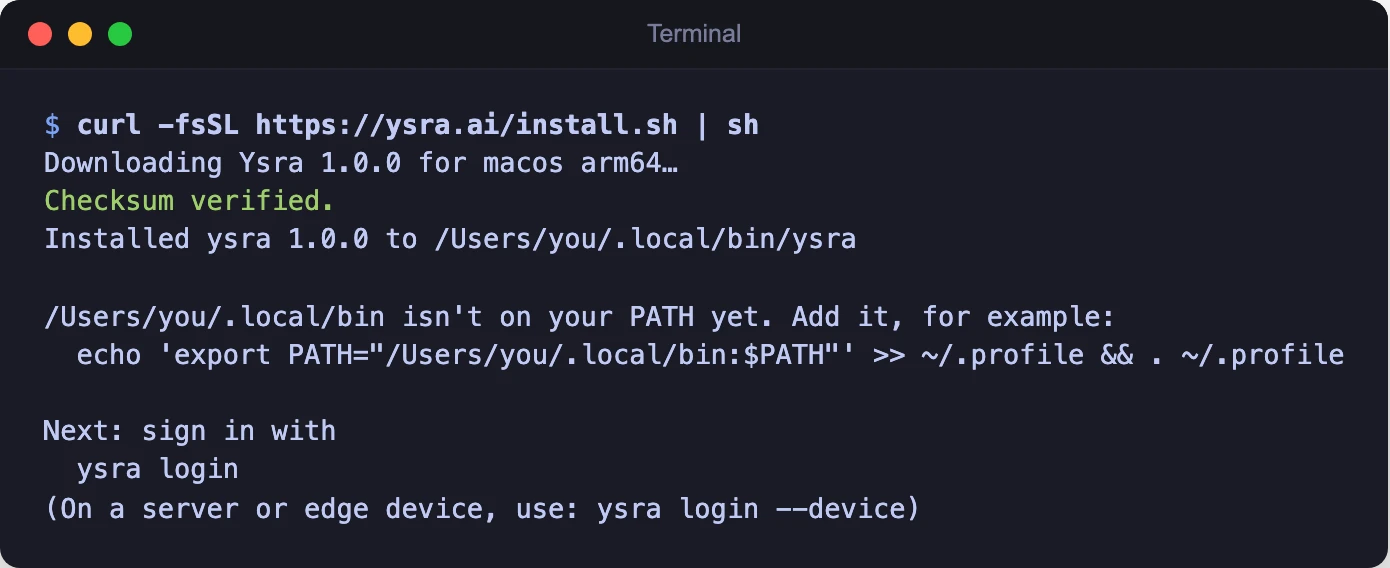
The installer checks the download before installing it
Then sign in:
ysra login
Options#
Pass options after -s --:
curl -fsSL https://ysra.ai/install.sh | sh -s -- --version 1.0.0
| Option | What it does |
|---|---|
--version X |
Install version X instead of the latest |
--dir D |
Install into folder D instead of ~/.local/bin (or set YSRA_INSTALL_DIR) |
--device |
For a server or edge device: also lists what the machine needs and how to sign it in. See Install on a server or edge device |
--allow-root |
Install even when run as root. Not recommended: Ysra is meant to run as you |
Windows#
Use the desktop app. There is no Windows build of the CLI yet.
Manual download#
If you'd rather not pipe a script into your shell, download the file yourself and check it.
Releases are published at https://downloads.ysra.ai/cli/<version>/, with
latest always pointing at the newest one.
| Machine | File |
|---|---|
| Mac, Apple silicon | ysra-macos-arm64 |
| Mac, Intel | ysra-macos-x64 |
| Linux, x64 | ysra-linux-x64 |
| Linux, arm64 (Jetson, Raspberry Pi) | ysra-linux-arm64 |
# 1. Download the build for your machine and the checksum list
curl -fsSLO https://downloads.ysra.ai/cli/latest/ysra-macos-arm64
curl -fsSLO https://downloads.ysra.ai/cli/latest/SHA256SUMS

# 2. Check it. This must print "ysra-macos-arm64: OK"
shasum -a 256 --ignore-missing -c SHA256SUMS     # Linux: sha256sum --ignore-missing -c SHA256SUMS

# 3. Install it
mkdir -p ~/.local/bin
install -m 755 ysra-macos-arm64 ~/.local/bin/ysra
If the check doesn't print OK, don't run the file. Download it again.
Check your version#
ysra --version
ysra 1.0.0 (build 330c400, 2026-10-03)
ysra doctor checks the rest of the machine, one line at a time, including
whether a newer version is out. See
ysra doctor.
Update#
ysra update
ysra update downloads the new build, checks it against the published
checksum, and swaps it in one step. If the check fails, your current copy stays
as it is.
Nothing updates on its own. When a newer version is out, I show one dim line as
you open ysra:
Ysra 1.0.1 is available — run `ysra update`
I check at most once a day and stay silent when you're offline. To turn the
check off, set YSRA_NO_UPDATE_CHECK=1.
Uninstall#
ysra uninstall
or, if ysra isn't on your PATH:
curl -fsSL https://ysra.ai/install.sh | sh -s -- --uninstall
This removes:
- the
ysraprogram; - my stored sign-ins on this machine;
- the background service, if you installed one;
- on a device, the device itself from your account. If I can't reach your account, I tell you to remove it under Settings → Devices.
Then I ask about my local data:
Also delete Ysra's local data (~/.ysra: snapshots for undo, logs, installed tools, targets)? [y/N]
The default is to keep it.
| Option | What it does |
|---|---|
--purge |
Delete ~/.ysra without asking |
--keep-data |
Keep ~/.ysra without asking |
~/.ysra holds your targets and what undo needs. Keep
a copy of targets.json if you want your targets back later.
I never touch your project folders or ~/.ssh.
Next#
-
Sign in, open a folder, ask a question or ask for a change.
-
The same work, in a window.