Runbooks
A written procedure run on a target: plan first, then one approved step at a time, a check after each, and a stop with the recovery step if anything fails.
On this page
A runbook is a procedure with more than one step: a method of procedure (MOP), a config change with a verify step, a script that creates several VMs. Give me the document, or describe the steps, and I turn it into a plan you can read before anything runs.
› @MOP-upgrade-core-sw-01.md run this on core-sw-01
The target must be in change mode.
How a runbook runs#
Plan#
I show every step: the command, its kind (read, change, destructive), the check that follows it, what the check should show, and what to do if it fails. Nothing has run yet. You approve the plan or cancel.
Dry run#
I run the read-only checks only, to confirm the starting state is what the procedure expects.
Step, then check#
For each step: I ask for your OK on the exact command, run it, then run its check. The next step starts only if the check passes.
Stop on failure#
At the first check that fails, I stop and show that step's recovery action. I don't try the next step and I don't improvise.
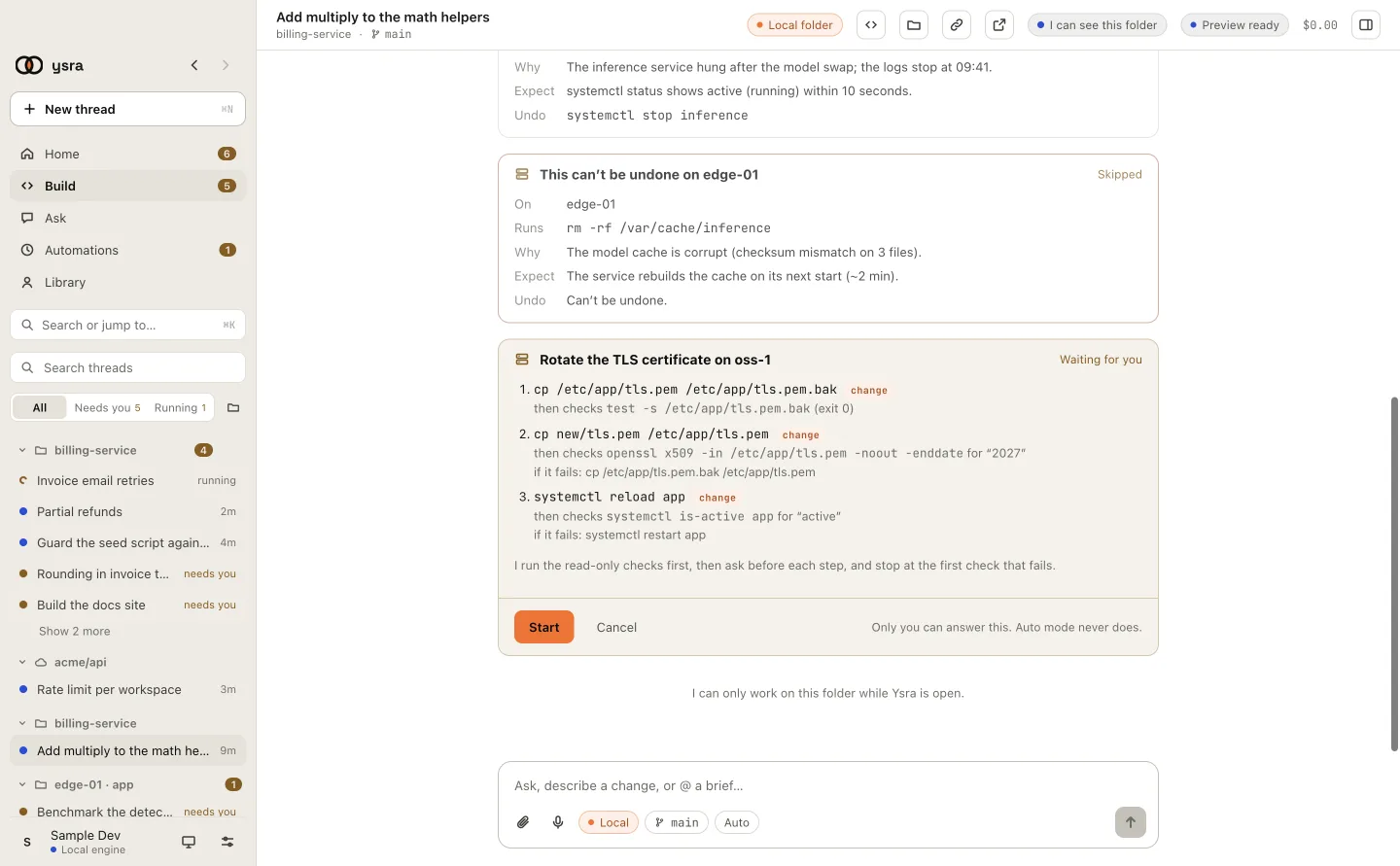
A runbook's plan before it runs
What a step looks like#
3. systemctl restart frr                         change
   then checks  vtysh -c "show bgp summary"  for "Established"
   if it fails: systemctl restart frr@backup
| Part | Meaning |
|---|---|
| Command | Exactly what runs |
| Kind | read, change or destructive. The same fixed rules apply |
| Check | A read-only command run right after |
| Expect | Text the check must contain, or the exit code it must return |
| If it fails | The recovery step I show you when I stop |
Approvals inside a runbook#
Approving the plan doesn't approve the steps.
- Each change step still asks, on the exact command.
- A destructive step on a production target still needs the target's name typed.
- Checks are reads, so they run under the one read OK for that target.
- Auto mode never answers any of it.
After a stop#
When a check fails you see which step, what the check returned, and the recovery step. From there:
- run the recovery step (it asks like any other change);
- fix the cause yourself, then ask me to resume from step N. That's a new plan and a new OK;
- or leave it there.
Good uses#
- A MOP on network gear: each step followed by its verification.
- A config change on an OSS: show the diff, validate, apply, verify, with the restore command ready before applying.
- Creating VMs on ESXi: read the inventory first, then create one VM per step, skip the ones that already exist, and report which succeeded.
Where a vendor's rules matter and I don't know them, I say so. Upload the vendor's document or your MOP and I work from it and cite it.
Every command a runbook runs is written to the target's log.