Work in a folder
Work with Ysra in a terminal folder: what it reads, what it asks first, choosing access, resuming threads, stopping, and credits.
On this page
A folder session is a chat with Ysra in the terminal, started with ysra
in a folder; that folder is what Ysra reads, changes and checks. Use it to ask
about code or have a change made on your own computer. This page is for
anyone using the CLI day to day. It explains
what happens in a session, when Ysra asks first, and how a session stops or
pauses; to install and sign in, see the quickstart.
The rule#
Ysra works only on the folder it was started in. A change stays in that folder as ordinary edits: nothing is committed or pushed until you say so, and anything that deletes your files, reaches outside the computer, or installs something asks first, in every access mode.
Starting in a folder#
cd ~/code/billing-service
ysra
| Situation | What happens |
|---|---|
| First time in this folder | Ysra asks whether you trust the folder and remembers the answer |
| A folder without Git | Works too. Ysra keeps its own record of the folder outside it |
| Same folder and branch as last time | The folder’s last thread opens |
| Not signed in | Run ysra login first; see Sign in |
A quiet line above the message box shows the folder, the mode, the model, the effort and the account.
Going back to an earlier thread#
Each folder keeps its threads.
| Command | Opens |
|---|---|
ysra or ysra --continue (-c) |
The folder’s last thread |
ysra --resume (-r) |
A list of this folder’s threads to pick from, as /sessions does inside the chat |
ysra --resume <thread> or ysra resume <thread> |
That thread, by its id or the start of it. If more than one thread starts that way, Ysra asks for more of the id |
If the thread can’t be opened, or the list is closed without a pick, the folder’s last thread opens.
Questions, changes and steers#
There is no mode to pick: Ysra reads each message first.
| You type | Ysra treats it as | What happens |
|---|---|---|
| “explain how refunds are calculated” | A question | An answer, with the files read to reach it. Nothing changes |
| “fix the failing invoice tests and add partial refunds” | A change | Ysra edits the folder, runs its checks, reviews the result and reports |
| Anything, while Ysra is working | A question or a steer | A question is answered; a steer is picked up at the next safe point |
@PLAN.md |
A written brief | Checklist items and anything under “Acceptance criteria” or “Done when” become the criteria the work is checked against |
What decides whether a message is a question or a change, and the states a change goes through, are in How a Code thread works.
Project instructions#
When the folder has instructions written for coding agents, Ysra reads them as the project’s instructions.
| Rule | Value |
|---|---|
| Files read | AGENTS.md, CLAUDE.md, YSRA.md |
| Where | The folder and its subfolders, up to 4 levels down |
| How many | At most 20 |
| Which applies | The nearest file to the code |
| Skipped | node_modules, .git, dist, build and similar |
Reading the timeline#
Everything Ysra does appears as it happens:
 › fix the failing invoice tests and add support for partial refunds

 ● Read AGENTS.md · src/billing/**
 ● Edit src/billing/refunds.ts  +6 −1
 ● Run pnpm test  exit 1
   ⎿ ✗ tests/refunds.partial.test.ts > exceeds balance
 ● Repair clamp to remaining balance; round to cents  +1 −0
 ● Run pnpm test

 ✓ Ready  1:42
   checks     ✓ pnpm test   ✓ pnpm typecheck
   acceptance ✓ a partial refund cannot exceed the remaining balance
| Mark | Meaning |
|---|---|
› |
What you typed |
● |
Something Ysra did: read, edit, run, review |
⎿ |
Evidence for the line above: output, a diff, a failing test |
The chat prints into the terminal itself, so scrollback, search and copy work
as usual. Ctrl+O shows the latest step in full. For full screen with the
message box pinned, start with ysra --fullscreen or choose it in
/settings → Screen. All keys: Keys.
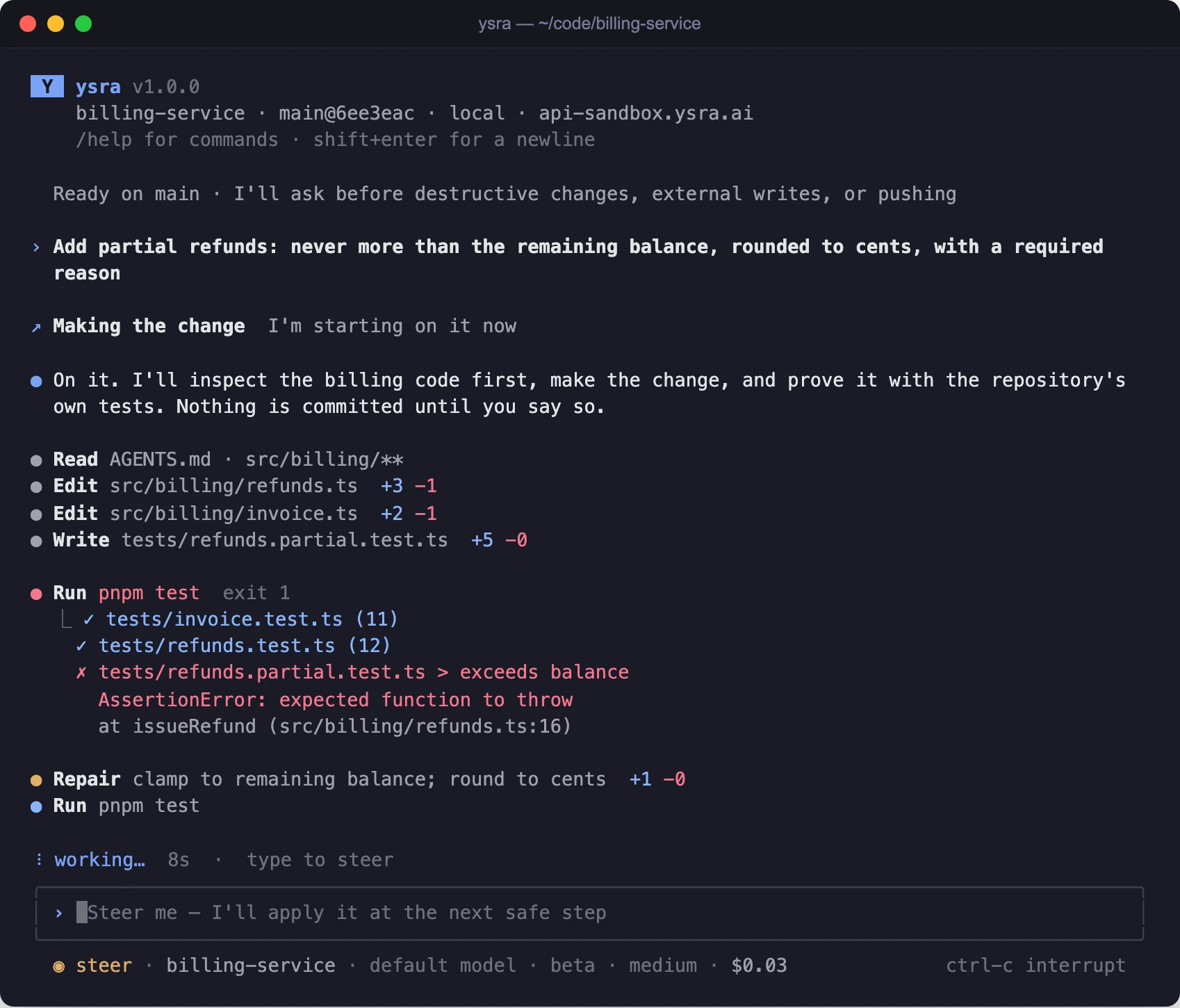
The working timeline during a change
When Ysra asks for your OK#
| Runs on its own, once you asked for a change | Asks first, every time |
|---|---|
| Reading files in the folder | Deleting a file it created in this task (it never deletes one it didn’t create) |
| Editing files in the folder | Anything that reaches outside the folder or the computer: a deploy, a publish, a push, creating something on a remote service |
| Running commands there, contained (on Windows, see Windows) | A Git change you didn’t ask for |
Looking with your own tools (gh pr view, netlify status) |
Installing or starting something on the computer (see Tools, setup and Docker) |
| Anything that changes a device or machine |
The question shows the exact command and where it runs, for example: “I’m
about to run netlify deploy --prod in this folder with your Netlify account.
OK?” “No”, or no answer, means Ysra doesn’t do it.
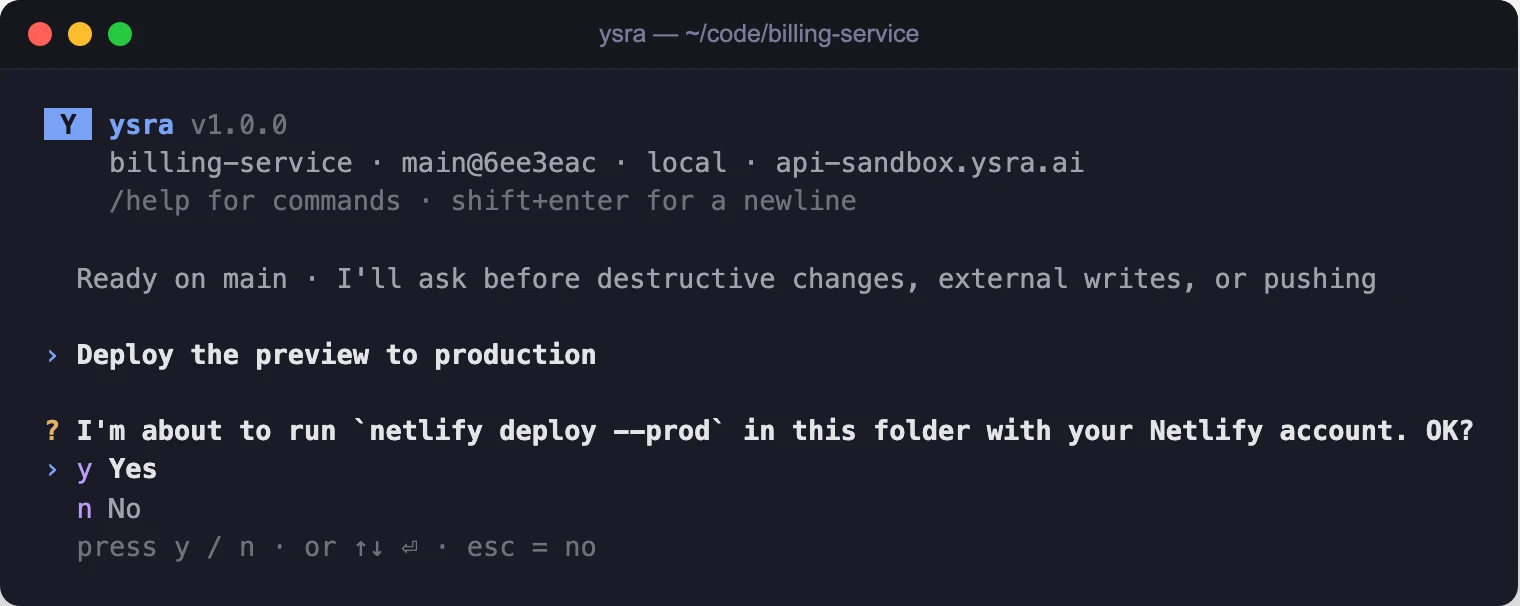
Asking before a deploy
Choose how much Ysra may do#
Each thread has an access: Auto, Asks first or Read only. Press Shift+Tab under the input to cycle through them, or type:
/access auto
/access ask
/access read-only
/auto on and /auto off still switch Auto on and off. Your last choice is
the default for new threads, and a thread you open again keeps its own. If
Ysra couldn't switch, the line says so and keeps showing the access the
thread really has. See Access modes.
| Asks first | Auto | |
|---|---|---|
| Starting work on a change | Asks | Goes ahead |
| Editing files and running commands in the folder | Goes ahead once started | Goes ahead |
| Deleting a file it created (it never deletes yours) | Asks | Asks |
| Deploying, pushing, publishing | Asks | Asks |
| A Git change you didn’t ask for | Asks | Asks |
| Installing or starting tools; the Docker question | Asks | Asks |
| A change on a device or machine | Asks | Asks |
In Read only, Ysra reads and explains: nothing in the folder is changed, installed or deleted, even by work already under way when you switch.
On Windows without WSL, Auto also lets commands run without asking, for that session only. See Windows.
Change options mid-thread#
/settings and /model apply inside the current thread from the next
message: Applies from your next message. The thread notes what changed, for
example From here on I’ll work with: high effort, a plan first. Work already
running keeps the options it started with. /mode, /model and /effort are
also kept for new threads.
Stopping and pausing#
| Situation | What happens | To go on |
|---|---|---|
You type /cancel |
What Ysra is doing stops; the thread and the changes so far are kept | Send the next message |
| The folder was deleted or moved | “That folder isn't there any more.” | Start ysra in the folder where it is now |
| You press Ctrl+C | The work is interrupted; twice quits | Run ysra in the folder again |
| You close Ysra while it works | It pauses: “I paused because Ysra was closed on this folder. Open it to continue; I kept my work.” | Run ysra there again; it carries on from the same place |
| Credits run out | It stops before its next step: “I paused because the credits ran out. Your changes are saved. Tell me to continue once there are credits.” | Add credits, then tell it to continue |
| The account is paused | “I paused because this account is paused. Your changes are saved. Write to support@ysra.ai.” | Write to support |
Credits in a session#
There are no per-task budgets to set; work uses the account’s credits.
| Where | What it shows |
|---|---|
| Status bar | Credits this thread and credits left, for example 212 credits this thread · 5,360 left |
/usage (/cost) |
Credits left, the plan and what used them |
| At 10% of the month’s credits or less | A notice with Add credits: ysra billing |
/billing |
Opens the web app’s Billing page; nothing is paid in the terminal |
See When credits run out.
Asking without opening the chat#
For a question that isn’t about the code, ysra ask answers in the shell and
saves any files the answer makes in the current folder:
$ ysra ask --file q3.xlsx "summarise revenue by region as a new spreadsheet"
All options: Ask from the terminal.
If it doesn’t work#
| Symptom | What to do |
|---|---|
| Commands never run; Ysra only reads and edits | The computer can’t contain commands. Run ysra doctor and see How Ysra runs commands |
| Every command asks, on Windows | Expected without WSL; see Windows |
| The wrong thread opens | Use ysra --resume to pick one |
| “Your sign-in expired” | Run ysra login again |
Related#
- Commit, push and undo — keeping Ysra’s work, or putting it back.
- Tools, setup and Docker — what Ysra may install or start, and how commands are contained.
- Access modes — Auto, Asks first and Read only.
- How a Code thread works — task states, checks and what is kept.
- Command reference — every command and slash command.