CLI quickstart
Install the Ysra CLI, sign in, and get a first change made in a folder on your computer, in five steps.
On this page
The Ysra CLI is the ysra program: a chat with Ysra in the terminal that
works on the folder it is started in. Use this page to go from nothing to a
first change you can keep or undo. Before you start you need a Ysra account
and a terminal on macOS, Linux or Windows; install options are in
Install the CLI.
Steps#
Install#
curl -fsSL https://ysra.ai/install.sh | sh
irm https://ysra.ai/install.ps1 | iex
On Windows Ysra asks before each command unless WSL is used. See Windows.
The download is checked against its published checksum before anything is installed, and it installs for your user only.
Sign in#
ysra login
The browser opens: choose Allow there. Over SSH, or with no browser,
ysra login prints a code to enter in the web app instead. See
Sign in.
Open a folder#
cd ~/code/billing-service
ysra
The first time, Ysra asks whether you trust the folder. A folder without Git works too.
Ask a question, then a change#
› explain how refunds are calculated
› add partial refunds: never more than the remaining balance, with a test
The question changes nothing. The change is made in the folder: Ysra reads the code, edits it, runs the checks and shows each step. Nothing is committed.
Keep it, or put it back#
| Command | What it does |
|---|---|
/diff |
Shows exactly what Ysra changed |
/commit |
Commits those changes on a branch; never pushes |
/undo |
Puts back what Ysra changed; your own edits stay |
The result: a change in the folder, checked, and either committed on a branch or undone.
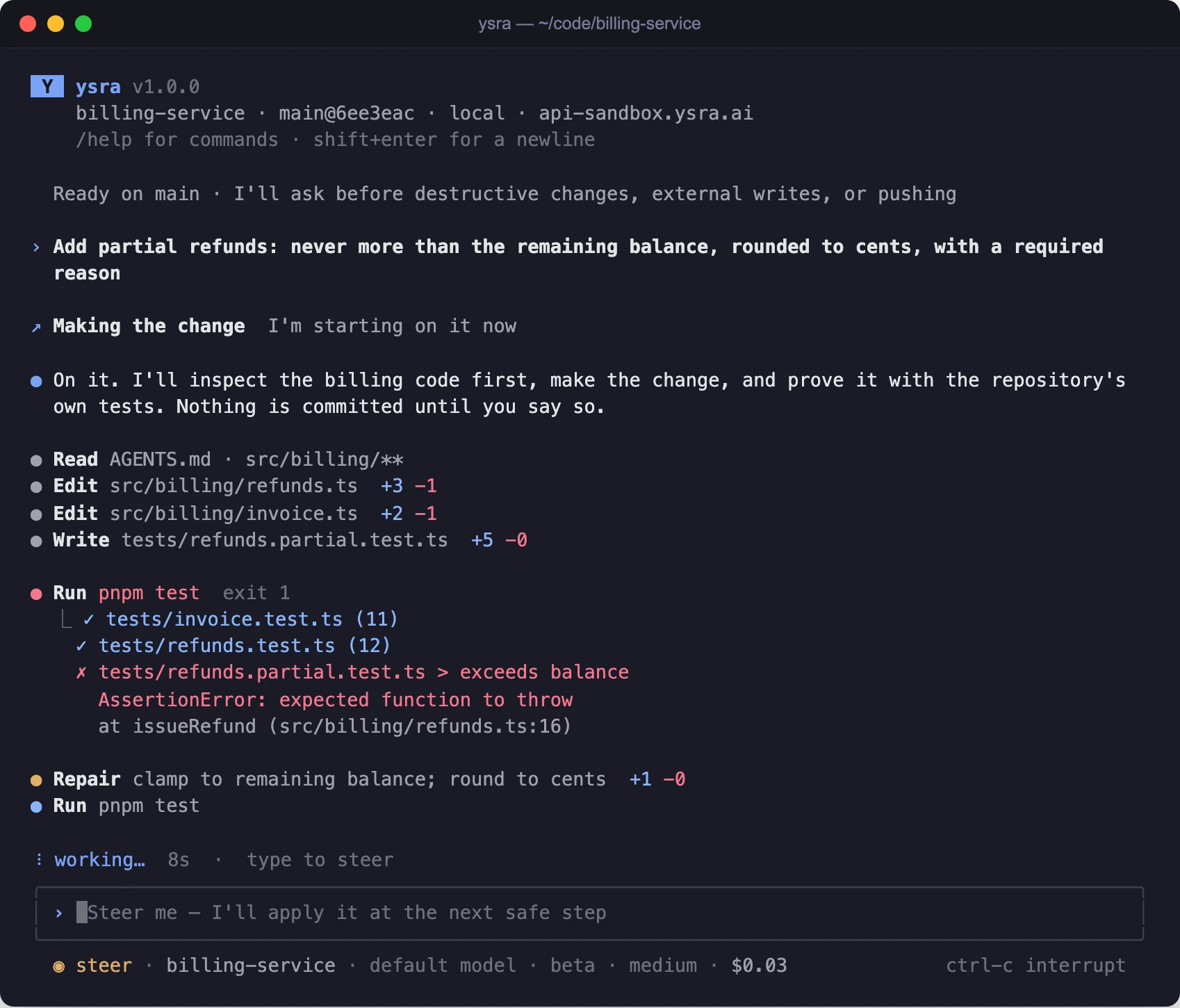
A change in progress: what Ysra read, what it edited, a failing test, the repair.
What runs without asking#
| Runs on its own inside the folder | Asks first |
|---|---|
| Reading, editing, running contained commands for a change you asked for | Deleting a file it created (it never deletes yours), anything that reaches outside the computer (a deploy, a push), installing or starting anything |
Details: When Ysra asks for your OK.
If it doesn’t work#
| Symptom | What to do |
|---|---|
ysra: command not found |
The installer said ~/.local/bin isn’t on your PATH; add it, or open a new terminal (Windows). See Install the CLI |
| The browser never opens at sign-in | Use ysra login --no-browser and enter the code in the web app |
| Commands never run | Run ysra doctor; see ysra doctor |
| Every command asks, on Windows | Expected without WSL; see Windows |
Related#
- Work in a folder — how a session works: timeline, approvals, auto mode, pausing.
- Commit, push and undo — branches, pushing, your CI read back, and exact undo.
- Run Ysra from a script — one task to the end with
ysra exec, for scripts and CI. - Devices — working on a folder on a server or edge device.
- Command reference — every command and slash command.