Stop and continue
Stop Ysra mid-step, continue after credits run out or the app was closed, and go back to a saved point in the desktop app.
On this page
Stopping ends the running task in a thread; continuing starts the next one from where it stopped. Nothing done so far is thrown away in any of the situations below. This page covers stopping, pausing and picking up again in the desktop app; for every state a task can end in, see How a Code thread works.
The rule#
A paused or stopped thread keeps its changes and what it checked. Continue (or saying “continue”) carries on from the same place; nothing is repeated.
At a glance#
| Situation | What the thread shows | How to continue |
|---|---|---|
| You stop it | Stopped safely. Your changes and what I checked are kept., then Stopped | Continue, or send the next message |
| Credits run out | I paused because the credits ran out. Your changes are saved. Tell me to continue once there are credits. | Add credits, then say “continue” |
| The account is paused | I paused because this account is paused. Your changes are saved. Write to support@ysra.ai. | Write to support |
| The app was closed | I paused because Ysra was closed on this folder. Continue when you’re ready and I’ll pick up where I stopped. | Continue |
| The connection dropped | Reconnecting to this folder…, then Folder not connected · retry | Click the chip |
| It stopped with a problem | Stopped with a problem, and why | Continue, or ask differently |
Stop#
| To stop | How |
|---|---|
| The button | The message box’s round button is Stop (“Stop (⌘.)”) while Ysra works and the box is empty |
| The keyboard | Cmd+. (Ctrl+. on Windows and Linux), or Esc when you’re not typing |
A queued or waiting task stops at once. A working task finishes its current step, then stops; the button shows a spinner meanwhile (“Stopping. Your work so far is kept.”), which takes a few seconds.
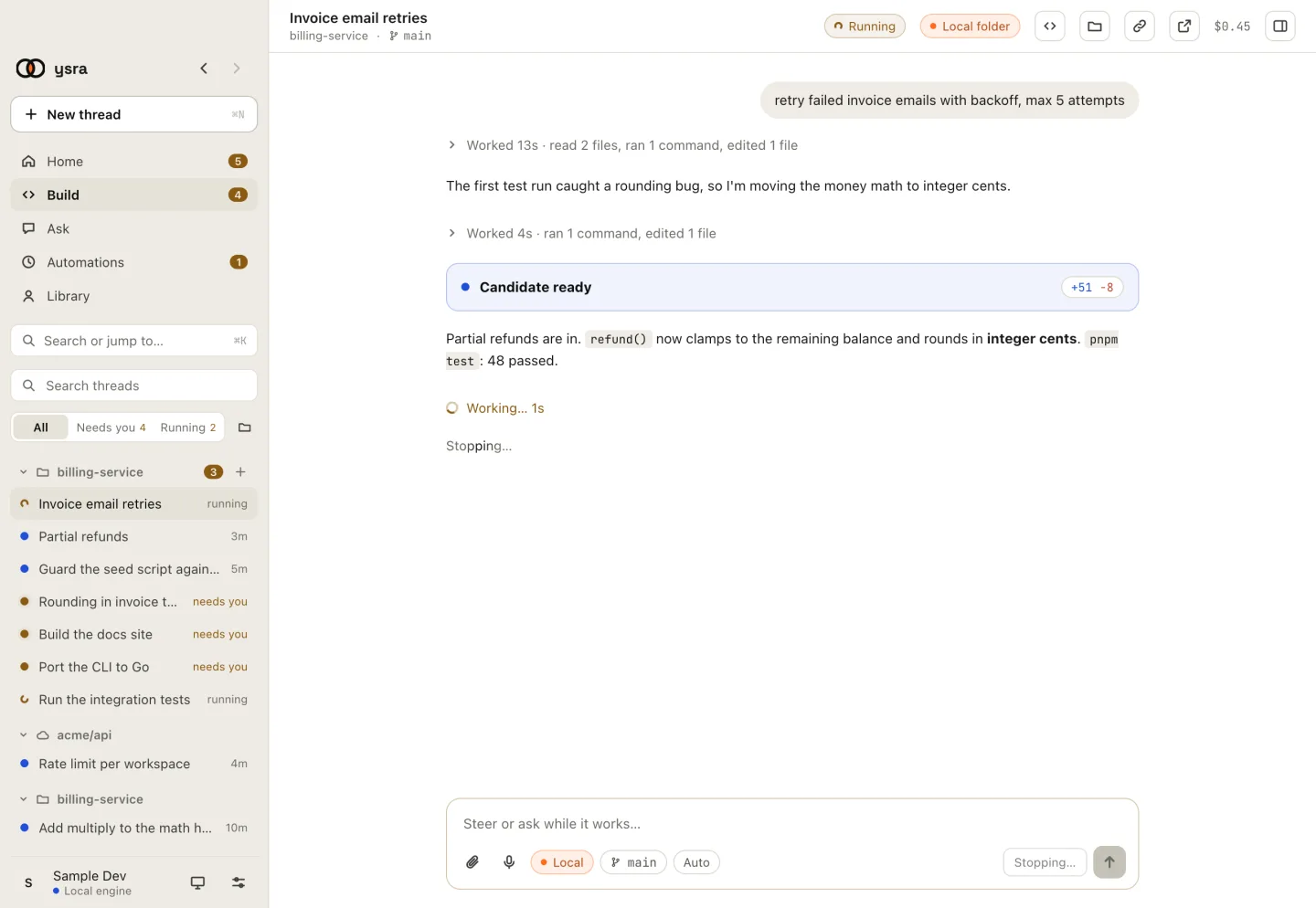
Stopping keeps the work so far.
The thread then says Stopped safely. Your changes and what I checked are kept., and the result card reads Stopped. From there:
| Choose | What happens |
|---|---|
| Continue | A new task starts from where this one stopped (it sends “Continue from where you stopped and fix what went wrong.”) |
| A new message | Ysra works on that instead |
| Undo changes… | Puts back what this work changed. See Undo my changes |
| Go back… | Returns to the last saved point. See below |
Tip
To change direction you rarely need to stop: type while it works. The box reads Steer or ask while it works…, and Ysra picks a steer up at the next safe point. There is one button: once you type, it sends instead of stopping.
When credits run out#
Before each paid step, a running task checks the balance. With none left it pauses, and the thread shows:
| Where | What it says | Buttons |
|---|---|---|
| In the thread | I paused because the credits ran out. Your changes are saved. Tell me to continue once there are credits. | Add credits · See plans |
| The thread’s line in the sidebar | I stopped at the limit set for this work. Your changes and what I checked are kept; add credits or raise the limit, then tell me to continue. | — |
| Home and Settings → Usage | The credits ran out. Work that uses credits is paused until more are added. | — |
Add credits, then tell Ysra to continue; it picks up where it paused. A member who doesn’t manage the account’s billing sees Billing for this account is managed by someone else. Ask them. instead of the buttons.
When the account itself is paused, the thread says I paused because this account is paused. Your changes are saved. Write to support@ysra.ai. and offers nothing to press: adding credits wouldn’t start the work again.
See When credits run out.
Close the app while Ysra is working#
Ysra can only work on a folder on this computer while the app is open here. If you quit, the task pauses. When you open the thread again it says I paused because Ysra was closed on this folder. Continue when you’re ready and I’ll pick up where I stopped. Choose Continue; nothing is repeated.
| System | Closing the window | Quitting |
|---|---|---|
| macOS | Ysra keeps running in the menu bar, and threads keep working | Cmd+Q, or Quit Ysra in the menu bar: threads on this computer pause |
| Windows and Linux | Ysra keeps running in the tray, and threads keep working. Where the desktop has no tray, closing the window quits | Quit Ysra from the tray: threads on this computer pause |
A thread in Ysra’s cloud doesn’t pause when you close the app: it runs on its own machine. See Code in Ysra’s cloud.
Lose the connection#
| The folder chip at the top of the thread | Meaning | What to do |
|---|---|---|
| Reconnecting to this folder… | The connection dropped; Ysra keeps trying for 10 minutes | Wait |
| Folder not connected · retry | It couldn’t reconnect in 10 minutes and stopped reading the folder | Click the chip to reconnect |
Threads that were working pause, and continue once the connection is back.
Go back to an earlier point#
Go back… on a finished task returns the folder to the thread’s last saved point. Ysra asks first (Go back to the last saved point?), then says Went back to saved point N. Affected checks will run again. A thread keeps up to 32 saved points. To go further back, or to a specific point, see Saved points.
Related#
- How a Code thread works: every task state and what is kept.
- Undo my changes: put the folder back as it was before Ysra started.
- Credits: adding credits and the monthly refill.
- Troubleshooting: when the app can’t reach Ysra.