Tools, setup and Docker
See how the CLI runs commands on your computer, which tools it uses or installs with your OK, how Docker is handled, and what ysra doctor checks.
On this page
Commands are the programs Ysra runs on your computer during a change:
tests, builds, your own tools. This page explains how they are contained,
which of your tools Ysra uses, what happens when a tool is missing or Docker
is needed, and how ysra doctor shows where the computer stands. On Windows
the rules differ; see Windows.
The rule#
Commands run contained to the folder, with the network closed, unless you allow more. Installing, starting or signing in to anything is never done without your OK, and auto mode never answers those questions for you.
How Ysra runs commands#
On macOS and Linux each command runs in a contained space on the computer.
| Contained command | |
|---|---|
| Writes | Only the folder you opened, a temporary folder, and package caches |
| Network | Off by default. Installing dependencies opens the package registries (npm, PyPI, crates.io, the Go proxy). A tool you’ve allowed opens only that tool’s own sites |
| Left behind | Nothing: Ysra’s bookkeeping never leaves stray files in the folder |
| Never read | .env files, private keys, ~/.ssh, ~/.gnupg, hosting-provider credential folders, browser profiles, keychains |
| The computer can’t contain commands | No command runs. Ysra says so and keeps reading and editing files. ysra doctor shows why |
Keep more files from Ysra#
Add patterns, one per line, to .ysra/deny in the folder:
secrets/**
*.tfstate
config/production.yml
Ysra can’t read, search or change anything that matches, and can’t edit this file either.
Your own tools#
When a folder opens, Ysra notes which tools are installed: git, node,
pnpm, python, go, docker, gh, and the command-line tools of common
hosting services such as netlify and fly. It sees names and versions,
never account names. So you can say “deploy this with my Netlify CLI” or
“open a pull request with gh”.
| Runs without asking | Asks first, every time, auto mode included |
|---|---|
Looking: netlify status, gh pr view, npm view |
Anything with an effect outside the computer: deploy, publish, create a release or pull request, set remote environment values |
Ysra uses the tool’s existing sign-in. It never signs in for you.
When a tool is missing#
| Situation | What Ysra does, with your OK |
|---|---|
| Node.js, Python or Git missing | Pauses and asks (“I need Node.js to run your tests. Want me to install it?” Install · Not now). Installs the official build, checksum verified, into ~/.ysra/tools: nothing system-wide, nothing in your shell changes |
| Another tool not installed | Installs with your package manager (Homebrew, winget, Scoop), or downloads the official build and verifies its checksum |
| Installed but not running (for example Docker) | Starts it |
| Not signed in | Nothing. Ysra shows the steps; signing in is yours to do |
ysra runs as root in a container |
May also install with apt-get, apk, dnf or yum |
Tools Ysra installed can be removed in the desktop app under
Settings → General → Installed tools, or by deleting ~/.ysra/tools.
Fixed limits, whatever Ysra is asked:
- no
sudo; - no installers that need your password (
.pkg,.dmg,.exe,.msi): Ysra gives the link and waits; - no removing or uninstalling anything;
- only what the prompt shows runs;
- auto mode never answers this question.
Afterwards Ysra checks the tool really works, then continues. Ask “how do I do it?” while it waits and it shows the steps to do it yourself.
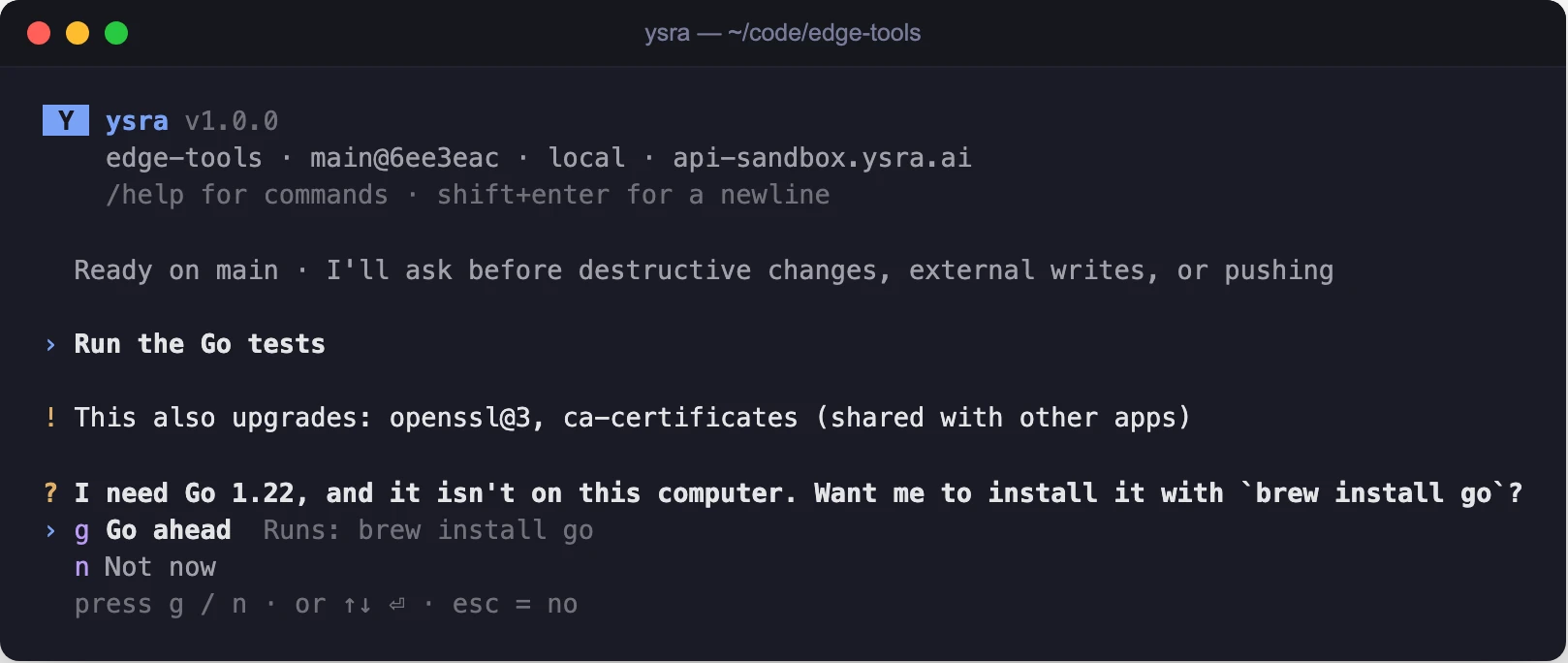
Asking before installing a missing tool, showing exactly what runs
When a command needs Docker#
Docker can reach well beyond one folder, so it has its own question: “Let my commands use Docker in this session?” Allow for this session · Not now.
| Rule | Value |
|---|---|
| Asked | Once per thread, the first time a command needs Docker |
| Lasts | That thread only |
| Auto mode | Never answers it |
| While allowed | /status shows Docker: allowed for this session |
| “Not now” | Ysra carries on without Docker where it can; say “continue” to be asked again |
ysra doctor#
ysra doctor
One line per check: ✓ fine, ✗ needs fixing, · information.
✓ ysra 1.20.0 (build …) (the latest)
· machine: macos arm64; package managers: brew
· hardware: 0 cameras, GPU: none
✓ commands: a test command ran safely contained
✓ Git: 2.50.1 (Apple Git-155)
✓ API: https://… (reachable; the default)
✓ signed in as you@example.com (from the Keychain)
· not signed in as a device (`ysra login --device`, on a server or edge device)
| Line | What it checks |
|---|---|
ysra |
The version, and whether a newer one is available |
machine |
The system, and the package managers Ysra may use with your OK |
hardware |
Cameras and GPU |
commands |
A test command really ran contained, or what’s missing |
Git |
Git is installed |
API |
Ysra can be reached from this computer |
| Sign-in | The sign-in on this computer and where it was found (the Keychain, the system keyring, an owner-only file, or on Windows a file only your account can decrypt), and a device’s sign-in |
| A line like | Means | What to do |
|---|---|---|
· ysra 1.8.0 (build …); 1.20.0 is out (`ysra update`) |
A newer CLI exists | ysra update |
✗ API: https://… can't be reached: the connection was refused |
No connection; the reason is named (DNS, TLS, a timeout, refused), with a hint if a proxy is set | Check the network, VPN or proxy |
✗ your sign-in expired (`ysra login`) |
Signed out | ysra login |
✗ this device was removed from your account (`ysra login --device` to add it again) |
The device was removed | ysra login --device |
✓ signed in as device edge-01 (observe mode) |
A device sign-in | — |
ysra doctor exits 1 when commands can’t run, Ysra can’t be reached, or a
device’s sign-in has failed, so a script can test it.
If it doesn’t work#
| Symptom | What to do |
|---|---|
| Commands never run; Ysra only edits files | The commands line in ysra doctor says what is missing |
| A test needs the network and fails | The network is closed in commands; ask Ysra to allow the tool, or run it yourself |
| Ysra waits on an installer | It needs your password; run the installer from the link it gave |
| Docker commands fail after “Not now” | Say “continue” and allow Docker for the session |
Related#
- Work in a folder — everything Ysra asks before doing.
- Windows — commands on Windows, WSL and contained commands.
- Install the CLI — installing, updating and uninstalling
ysra. - Security and privacy — what Ysra reads and keeps.