Approvals and auto mode
Know what Ysra asks before doing in the desktop app and what runs on its own in Auto, answer its cards and dialogs, and see what Auto never covers.
On this page
An approval is Ysra stopping to ask before it does something, in a card in the thread or in a system dialog. With access set to Auto, work inside the folder goes ahead without asking; Auto never covers anything destructive, outside the folder or outside your computer. This page lists what asks and what doesn’t, for anyone deciding how much to let Ysra do on its own. For machines reached through a gateway, see Approvals and automatic runs.
The rule#
“Not now”, a closed dialog, or no answer always means Ysra doesn’t do it. Deploying, publishing, pushing to the default branch and anything that overwrites ask every time, whatever else is switched on. Ysra never deletes files it didn’t create.
What asks first, and what runs on its own#
| What Ysra is about to do | Asks first | Auto |
|---|---|---|
| Start work that uses credits in this thread | Asks | Goes ahead |
| Edit files inside the folder | Asks before starting the work | Goes ahead |
| Run a command inside the folder (contained, on macOS and Linux) | Asks before starting the work | Goes ahead |
| Start a plan you approved | Asks | Goes ahead |
| Run a command that reaches the internet, another machine or your git remote | Once per thread (the commands card) | Goes ahead |
| Commit on a branch Ysra made, or your current non-default branch | Once per branch in the thread (a branch Ysra made: goes ahead) | Goes ahead |
| Commit on the default branch | “Commit on main? Or I can make a branch first.” | The same question |
| Run a command that overwrites files | Asks, every time (a red card) | Asks, every time |
| Run a command that names a path outside the folder | Asks, every time | Asks, every time |
| Delete a file Ysra created in this thread (unchanged since) | System dialog, every time | System dialog, every time |
| Delete a file Ysra didn’t create | Never | Never |
| Push a branch Ysra made in this thread | System dialog; never forced | Goes ahead; never forced |
| Push any other branch | System dialog | System dialog |
| Push to the default branch | System dialog, every time | System dialog, every time |
| Deploy, publish, or run anything that reaches outside your computer | System dialog, every time | System dialog, every time |
npm publish, docker push, a sign-in, a token, changing a Git remote |
Asks, every time | Asks, every time |
| A Git change you didn’t ask for in this thread | Asks | Asks |
| Install or start a tool | A card (Install tools, Machine setup) | A card |
| Use Docker | Once per thread (Docker) | Once per thread |
| Use the camera or GPU on a device | Once per thread | Once per thread |
| Look around a machine | Once per thread | Once per thread |
| Change something on a machine | Every change | Every change |
In Read only, Ysra reads and explains: it edits nothing, runs no command that changes anything, installs nothing and starts no plan until you switch back. See Access modes.
On Windows, commands aren’t contained unless you choose WSL, so the rules differ: see Ysra Desktop on Windows.
Cards in the thread#
A card says what will happen and offers the answers. Cmd+Enter (Ctrl+Enter on Windows and Linux) approves the card in front of you.
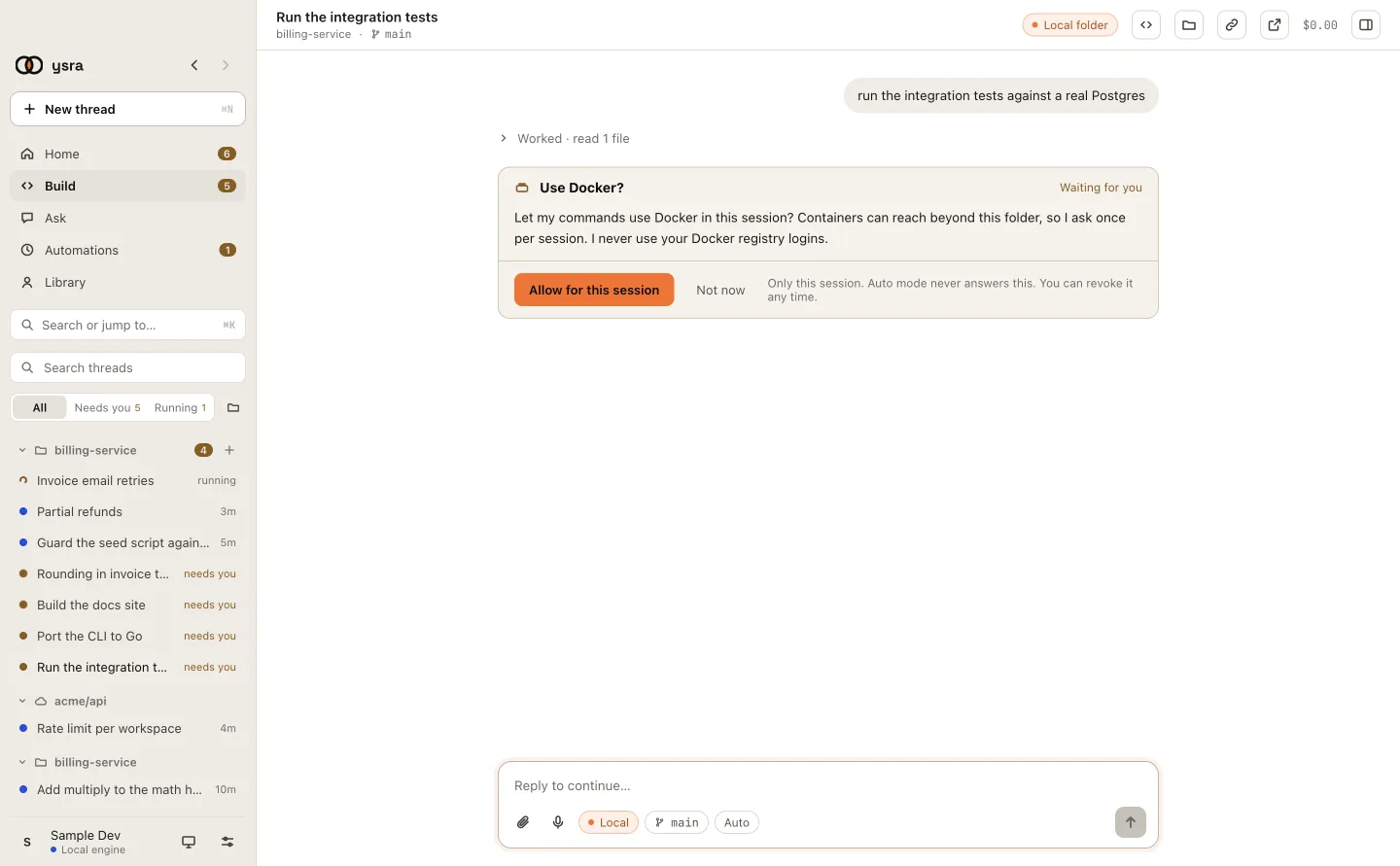
A card: Ysra waits until you answer.
| Card | When it appears | Answers |
|---|---|---|
| Start paid execution? | The first change in a thread, only when the workspace has Ask before paid work on | Approve & start · Not now |
| Start building the approved plan? | You approved a plan with Asks first | Start building · Not now |
| Commit the reviewed changes locally? / Commit and push my changes? | You chose Commit… or Commit & push… | Commit, or Commit & push · Not now |
| Undo my changes? | You chose Undo changes… | Undo · Not now |
| Go back to the last saved point? | You chose Go back… | Go back · Not now |
| Allow dependency installs? | A task needs to install packages from the internet | Allow & continue · Not now |
| Install tool? (for example Install Node.js?) | A task needs Node.js, Python or Git and this computer has none | Install · Not now |
| Install Go?, Start Docker?, Sign in to … | A tool is missing, stopped or signed out | Go ahead · Not now, or I’ve done it · Show me how |
| Use Docker? | A command needs Docker, once per thread | Allow for this session · Not now |
| Use the camera and GPU on edge-01? | A task on a device needs its hardware | Allow for this session · Not now |
| Look around edge-01? | The first time Ysra reads a machine in a thread | Allow for this session · Not now |
| Run this on edge-01? | Every change on a machine | Run it · Skip |
| Run this command? | A command that deletes or overwrites, reaches outside the folder, or isn’t contained. See The command card | Run once · Allow npm for this session · Don’t run, or Don’t run · Run it anyway |
A card that needs information instead of a yes or no is marked INPUT: pick one of its options, or reply in the message box.
The command card#
Run this command? shows Waiting for you, the exact command (Runs) and the folder (In). A red line says why it asks:
| Red line | When | Answers |
|---|---|---|
| “It runs contained, but it deletes or overwrites files. Your .git and uncommitted work stay out of its reach.” | A contained command that deletes or overwrites inside the folder | Don’t run · Run it anyway |
| “This deletes or overwrites things, and it can’t be undone.” | The same, uncontained | Don’t run · Run it anyway |
| “This reaches outside this folder.” | The command names a path outside the folder | Don’t run · Run it anyway |
| “This deletes or overwrites things outside this folder, and it can’t be undone.” | Both | Don’t run · Run it anyway |
| No red line, “This command isn’t contained: it can reach the network and anything your account can.” | Windows without WSL | Run once · Allow npm for this session · Don’t run |
A card with a red line is never offered for the whole session, and auto mode never answers it. Every command card ends with “Only you can answer this. Auto mode never does.”
The card shows hidden characters as code points, for example <U+202E>, so
text that reads one way and runs another can’t hide in it.
A command that would delete a file Ysra didn’t create never gets a card: the thread says “I don't delete files I didn't create, so I didn't run it. Delete it yourself if you want it gone.”
| The command’s line in the thread | Meaning |
|---|---|
Waits for your OK: npm install |
The card is waiting |
Didn’t run npm install · you said not now |
You declined, or nobody answered in 15 minutes |
Didn’t run … · Blocked: … |
Ysra refused it by itself; no card was shown |
System dialogs#
Three things are asked in a system dialog, so they can’t be missed. The default button is Not now, and no answer within 2 minutes counts as no.
| Dialog | Example question | Second line | Button |
|---|---|---|---|
| Something that reaches outside your computer (a deploy, a publish) | “I’m about to run netlify deploy --prod in this folder with your Netlify account. OK?” |
“This reaches outside your computer, so I ask every time, even in auto mode. Nothing runs if you say no.” | Run it |
| A push | “I’m about to push release-1.4 to origin. OK?”, or “I’m about to push main to origin, its default branch. OK?” | “I ask before a push unless you chose Auto for a branch I made in this thread. I never force-push.” For the default branch: “It’s the default branch, so I ask every time, even in Auto. I never force-push.” | Push it |
| Deleting a file Ysra created | “I’d like to delete notes/draft.md. I created it in this thread and it hasn’t changed since. OK?” | “I made this in this thread and it hasn’t changed since. I never delete files I didn’t create myself. Nothing is deleted if you say no.” | Delete it |
Auto mode#
Auto mode lets Ysra go ahead inside the folder without asking. It is the Auto choice in the message box’s access control.
| To turn it on | How |
|---|---|
| For one thread | Choose Auto in the message box’s access control (“Works through without asking; still asks before deleting, deploying or system installs.”). Asks first or Read only turns it off. See Access |
| For every new thread | Settings → General → Auto mode for new threads |
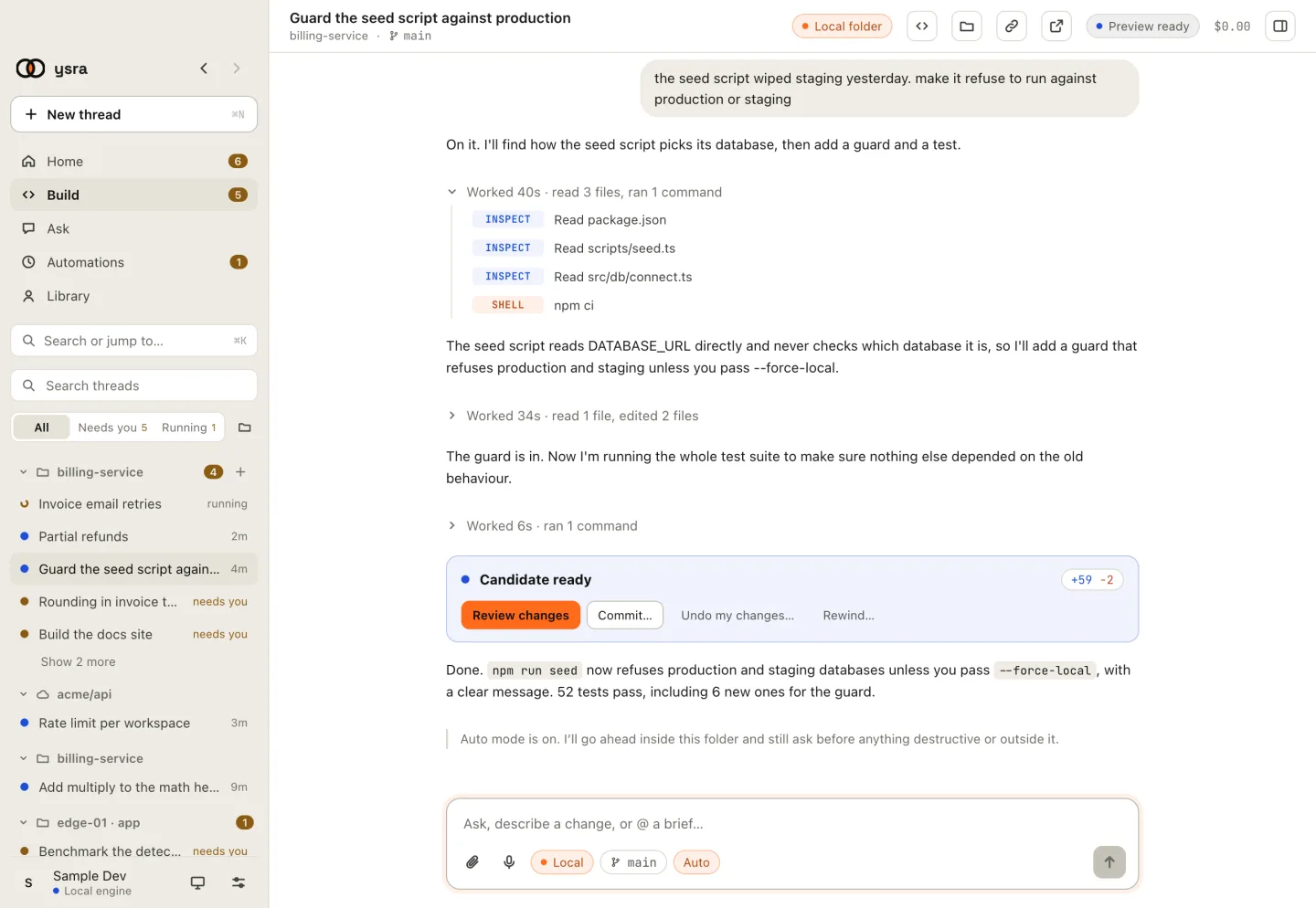
Auto mode on for this thread.
When you switch it, the thread notes it: Auto: I’ll work through without asking, and still ask before deploying or system installs. I never delete files I didn’t create myself; a script I run inside your project can, and undo brings them back.
Auto mode never answers: a red command card, a system dialog, a tool install, Docker, a device’s hardware, or anything on a machine.
When nobody answers#
| Question | Waits | Then |
|---|---|---|
| A system dialog | 2 minutes | Counts as Not now |
| A command card | 15 minutes | Counts as Don’t run |
| A machine card | 15 minutes | Counts as declined; quitting the app declines every waiting one |
| Any other card in the thread | Until you answer | The thread waits under Needs you |
Where to see what’s waiting#
| Where | What it shows |
|---|---|
| Needs you in the sidebar’s panel | Every thread waiting, with what it waits for |
| Home, under Waiting for you | The same, as cards |
| The tray icon (Windows and Linux) | How many threads are waiting |
Related#
- Access modes: Auto, Asks first, Read only and Plan first.
- Start a thread: the access control in the message box.
- Ysra Desktop on Windows: how commands ask when they aren’t contained.
- Commit and push: the commit card and the push dialog.
- Approvals and automatic runs: signed approvals for machines.