Commit and push
Keep a finished change from the desktop app: commit it on a new or existing branch, push it with your OK, and read your CI result in the thread.
On this page
Commit turns a finished change in your folder into a Git commit on a branch; push sends that branch to your remote. Ysra commits and makes branches with its own git tool, as your thread's access mode allows, and you can commit or push a finished change yourself at any time. Before you start: the folder needs Git (see Folders without Git). In Ysra’s cloud, delivery handles commit and push: the thread delivers with Open pull request… or Push; see Code in Ysra’s cloud.
When Ysra commits on its own#
While it works, Ysra may commit its changes as it goes, the way you would.
| Where it would commit | Auto | Asks first |
|---|---|---|
| A branch it made in this thread | Commits | Commits |
| Your current branch, when it isn't the default branch | Commits | “Commit my changes on feature/x?” once per branch in the thread |
The default branch (main, master) |
“Commit on main? Or I can make a branch first.” | The same |
Say no to the main question and Ysra makes a branch for the work instead.
Each commit is a new commit on top, holding only the files Ysra changed:
nothing of yours is rewritten. In Read only, Ysra never commits.
Commit#
- Choose Commit… on the finished task, or say “commit”.
-
Fill in the card Commit the reviewed changes locally?:
Field What it does Commit message Filled in for you, after the change that produced it; edit it Branch (new or existing, optional) Empty: a new branch named after the work, and your folder switches to it. A name that doesn’t exist: Ysra creates it. A name that exists: Ysra adds its commit to it without switching your folder Must be a new branch Ysra stops if the name is taken, instead of adding to it -
Choose Commit.
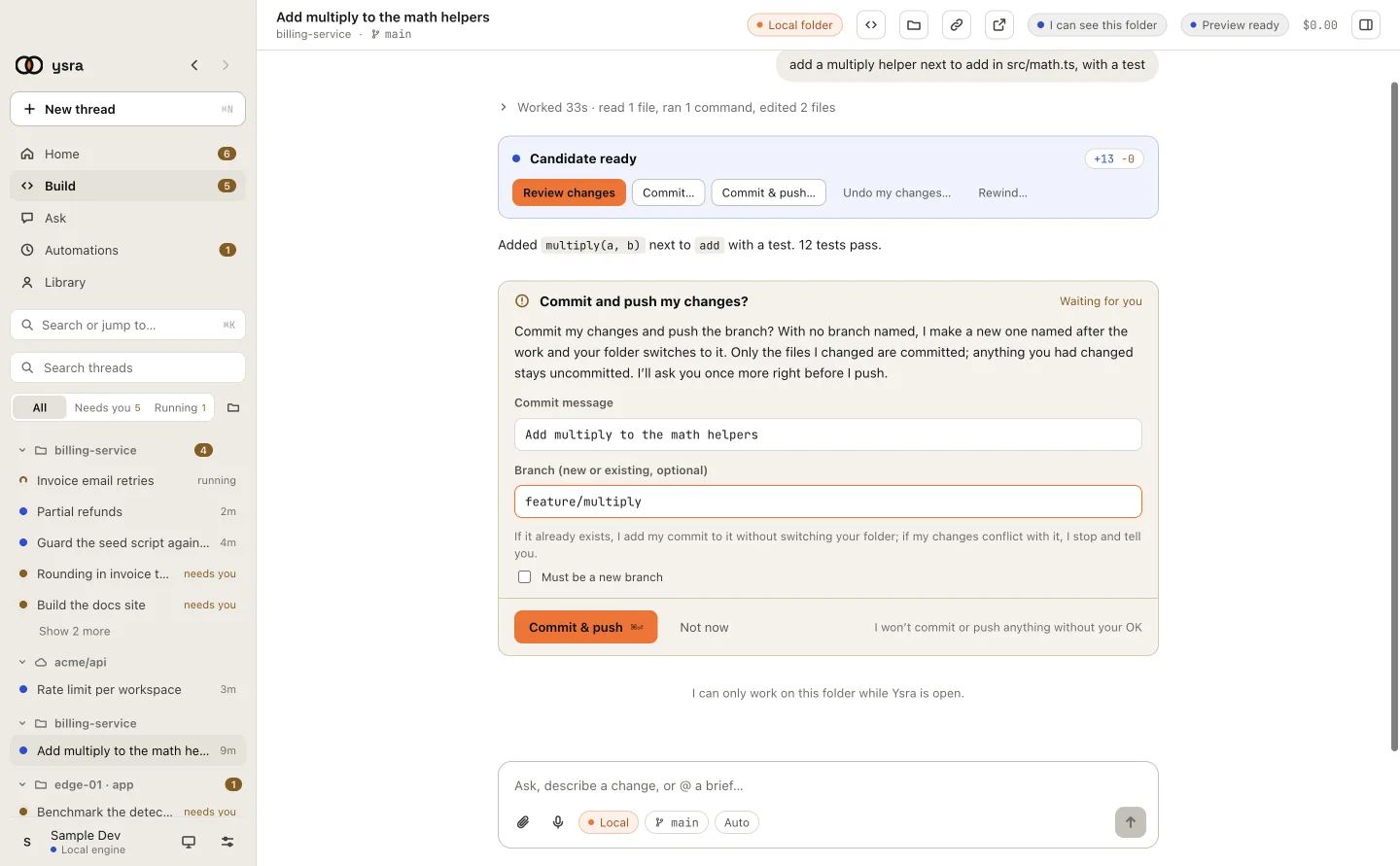
Commit message, branch, and whether the branch must be new.
What goes in:
| Committed | Only the files Ysra changed |
| Left uncommitted, where it is | Anything you had changed |
| Your Git hooks | Run as usual |
Commit and push#
Choose Commit & push… (“Commits on a ysra/… branch and pushes it, after one more OK”), or say “commit and push”. The card Commit and push my changes? commits first; then the push:
| The push | What happens |
|---|---|
| A branch Ysra made in this thread, in Auto | Pushed without asking |
| Any other branch | A system dialog asks: “I’m about to push release-1.4 to origin. OK?” |
| The default branch | Asks every time, even in Auto: “I’m about to push main to origin, its default branch. OK?” |
Choose Push it. Not now, or no answer within 2 minutes, means no push; the commit stays. Ysra never force-pushes.
What happens when …#
| Situation | What Ysra does |
|---|---|
| The change’s checks didn’t all pass | You can still commit; the receipt line says what ran and what failed |
| Ysra’s changes conflict with the existing branch | Stops, names the files, and commits nothing |
| Must be a new branch is ticked and the name exists | Stops and says so |
| The remote has moved ahead | The push is rejected and Ysra tells you. It never forces |
| The branch isn’t one Ysra created or committed onto in this thread | Ysra doesn’t push it |
| The folder has no Git | Commit… isn’t offered |
| You edited the files after Ysra finished | Ysra won’t commit them as its own work, and says so |
Your CI, in the thread#
After a push Ysra reads your repository’s own checks and reports them, for example:
| Result | The thread says |
|---|---|
| Passed | Your CI passed on ysra/partial-refunds (4 checks green). |
| Failed | Your CI failed on ysra/partial-refunds: test. Want me to look into it? |
| Can’t see it | That it can’t see your CI from here |
Ysra reads it with tools you already have signed in on this computer (gh
for GitHub, glab for GitLab), and only reads.
What Ysra never does in your Git#
- No force push.
- No deleting branches, tags or stashes.
- No hard reset, clean, rebase, or amending commits it didn't make.
- No raw
gitcommands that write your repository: commits and branches go through Ysra's own git tool. - No commits of its own record: Ysra’s history of its changes is kept in
~/.ysra, outside your folder.
Related#
- Review the diff: check All changes before you commit.
- Undo my changes: put everything back instead; not possible once committed.
- Approvals and auto mode: the push dialog.
- Publish or Deploy: putting the change online.