Review the diff
Review exactly what Ysra changed in the desktop app before you keep it: the diff, the report, line comments and a live preview.
On this page
The review pane shows every file a task changed next to what it was, and the report of what was checked. Use it before you commit, push or undo: nothing Ysra changes is kept until you decide. This page covers the pane, line comments, the file view and trying the change; for what the checks mean, see Review and verification.
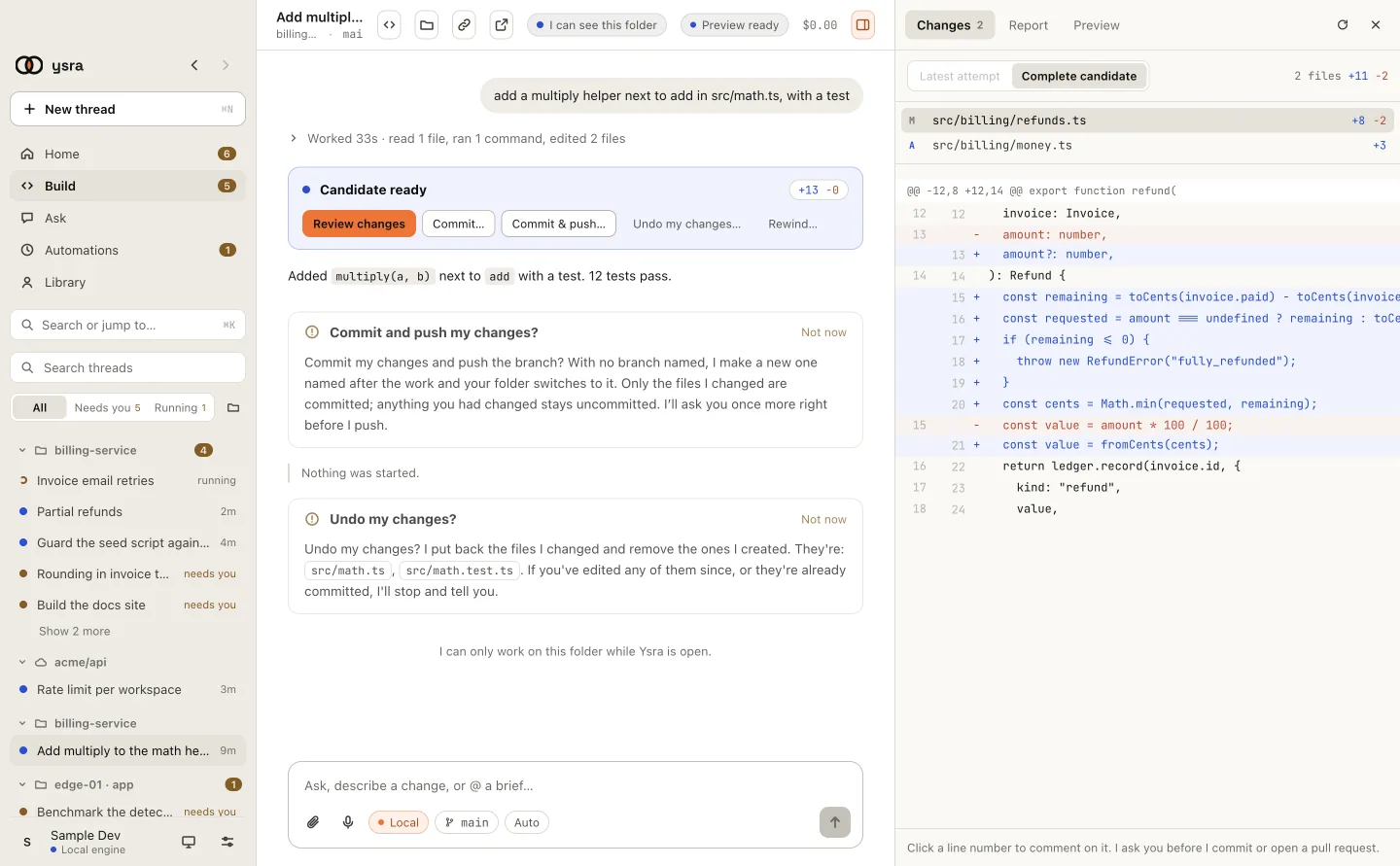
Every file Ysra changed, next to what it was.
Open the review#
| From | How |
|---|---|
| A finished task | Review changes, or click the +N −N count on the result card |
| Anywhere in a thread | Cmd+Shift+D (Ctrl+Shift+D on Windows and Linux) opens and closes the pane |
Changes#
The file list shows each file with the lines added and removed. Click one to see its diff.
| Scope | Shows | Use it to |
|---|---|---|
| Latest attempt | Only what Ysra’s most recent attempt added | See what a repair or a steer changed |
| All changes | Everything a commit would contain | Check before you commit: it is exactly what goes in |
Comment on a line#
- Click a line number.
- Type what should change, and choose Add comment. Enter saves the comment, Esc cancels it.
- When you’re done, Send to Ysra sends every comment as one request; Discard drops them.
Ysra revises the change, and you review again.
Report#
The Report tab, next to Changes, is one receipt for one version of the change. Until a run has been verified, it says “No Code Report yet. It appears once a run has been verified.”
| Section | Shows |
|---|---|
| Result | A status, then what Ysra claims it did, or why not |
| Acceptance | How many criteria passed out of the total, then each criterion marked ✓, ✗ or ·, with its evidence |
| Repository checks | Each command Ysra ran, marked ✓ or ✗, with how many seconds it took, and · reused when an earlier result was reused |
| Browser | A status, and what the browser check showed or why there wasn’t one |
| Credits | The credits the work used |
| Delivery | A status, then the pull request’s link, or commit with the first 12 characters of the commit, or why nothing was delivered |
A task that ended Didn't work says so on its result card, and the thread
says what failed. The change is kept; you can still review, commit or
deliver it. Every ending has one line that says what Ysra ran, such as
“Ran: npm test (passed).”
Open a file beside the thread#
Click a file name anywhere in the thread, or the Files button at the top of the thread, to read it next to the conversation.
| Part | What it does |
|---|---|
| The folder tree | Filter files, Open all folders, Close all folders; each file marked Added, Changed, Deleted or Renamed |
| Wrap | Wraps long lines |
| Copy path | Copies the file’s path |
| Copy | Copies the file. Line numbers are not copied |
| Open in editor | Opens it in your own editor |
| Reveal | Shows it in your file manager |
The file is shown with syntax colours and line numbers. A file on a device is marked on device · read only.
Try the change yourself#
The Preview button at the top of a thread opens the app being built in a small browser beside it. Nothing is committed by running it.
| Thread | What the Preview pane does |
|---|---|
| On this computer | Shows the address the thread’s dev server gave, such as http://localhost:5173. With nothing running it says Nothing is running yet. Start the app and it shows here.: choose Start preview, which sends “preview” to the thread (never charged as a change) |
| In Ysra’s cloud | Starts the app on the thread’s cloud machine. See Previews |
You can also run the app in the folder with your own tools. In the
CLI, /preview starts your app and /stop-preview
stops it.
Related#
- Commit and push: keep what you reviewed.
- Undo my changes: put it all back instead.
- Review and verification: what the checks prove.
- Previews: every preview state, and phone apps.