Projects
Run work too big for one thread as a project — an approved architecture, milestones and tasks integrated on the project's branch — and act on what each task needs.
On this page
A project is Code work too large for a single thread (a new product, a multi-part feature, a migration across many modules), split into an approved plan of milestones and tasks; each task runs on its own and its result is integrated on the project’s branch. Use one when a single plan card would be too big to review. This page covers the list, the project view and the actions; a single thread’s plan is on Plans and acceptance criteria.
The rule#
A project stops and waits for you at every decision: the architecture, each milestone, any question. Nothing that uses credits starts without your OK, and the project never spends past the credits you allowed it.
Finding a project#
Library → Projects lists your projects.
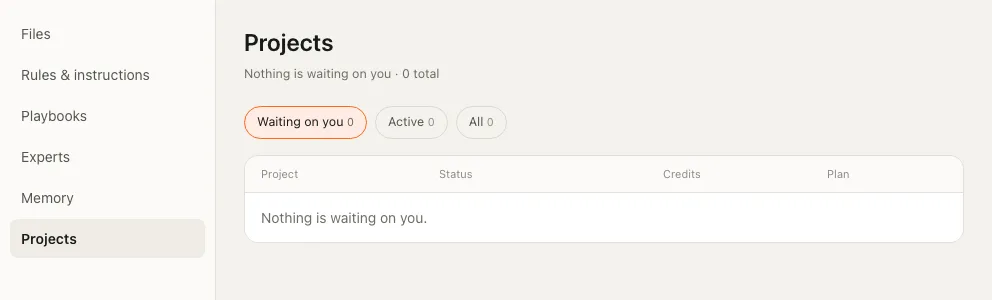
| Filter | Shows |
|---|---|
| Waiting on you (the default) | Projects stopped until you act: an architecture or milestone to approve, or a question to answer. These come first. |
| Active | Projects that are running |
| All | Every project, most recently changed first |
| Column | Shows |
|---|---|
| Project | Its name and brief; for a stopped project, why it stopped |
| Status | Where it is, such as running or awaiting user |
| Credits | Credits used, of the credits allowed |
| Plan | Tasks done, such as ⅜ tasks, or no plan |
The project view#
| Part | What it holds |
|---|---|
| Header | Status, credits used of credits allowed, plan version |
| Banner (when stopped) | Why it waits, and whether it resumes by itself |
| The brief | What the project was started with |
| The approved architecture | Topology, stack, database, estimated credits, and the scope it is limited to |
| The risks | What Ysra recorded before any work started |
| The plan | Each milestone with its status; under it each task with its key, the tasks it runs after, credits used, its checklist, what it is done when, and what is out of scope. After review, each criterion shows its verdict and reason, and any checks the reviewer added. |
Actions#
Only the actions the project’s state allows are offered; when none apply, there are no buttons.
| Action | Use it to |
|---|---|
| Approve / Reject | Answer a decision the project waits on. A note is recorded with your answer. |
| Start key | Start the next ready task. It uses credits, so the app asks first. |
| Retry key | Run a failed or stopped task again from its preserved work. |
| Integrate key | Bring a finished task’s result onto the project’s branch. The app asks first. |
| Reconcile key | Bring the project’s view of a running task up to date. |
| Allow this total | Raise the credits the whole project may use. |
| Allow for this work item | Give one task more credits. Raising the total doesn’t pass the extra to work in progress, so allow it for the task too. |
What happens when …#
| Situation | What happens |
|---|---|
| A task needs a decision | The project stops, appears under Waiting on you, and the banner says why. |
| Credits run out | The running task stops before its next step and keeps everything. See When credits run out. |
| A task reaches its credits | It stops; Allow for this work item gives it more. |
| A task failed or was stopped | Retry key runs it again from its preserved work. |
| You want to rewind one task whose work is already integrated | Limited: the project, not the task, owns that result. |
| Cloud isn’t on for the account and an action would start work on Ysra’s servers | Refused: “Code runs on your own computer now. Open the Ysra desktop app or the command line in your project’s folder to start it.” Get the apps shows where to get them. |
Related#
- Plans and acceptance criteria — a single thread’s plan and criteria.
- How a Code thread works — what each task goes through.
- Credits and usage — what a project’s tasks use.
- In Ysra’s cloud — where cloud work runs.