Undo my changes
Undo a finished change from the desktop app, exactly as it was, and understand why undo sometimes refuses.
On this page
Undo puts the files a finished task changed back exactly as they were before Ysra started, and removes the files it created. Use it when you don’t want the change at all; to step back only part of the way, use Go back. This page covers what undo does and when it refuses.
The rule#
Undo never overwrites your own work. If a file Ysra changed was edited since, it changes nothing and says why.
Steps#
- Choose Undo changes… on the finished task (“Puts back the changed files and removes the new ones”), or say “undo your changes”.
- Read the card Undo my changes?. It names the files and says: “If you’ve edited any of them since, or they’re already committed, I’ll stop and tell you.”
- Choose Undo.
The thread then says which files it put back and which it removed.
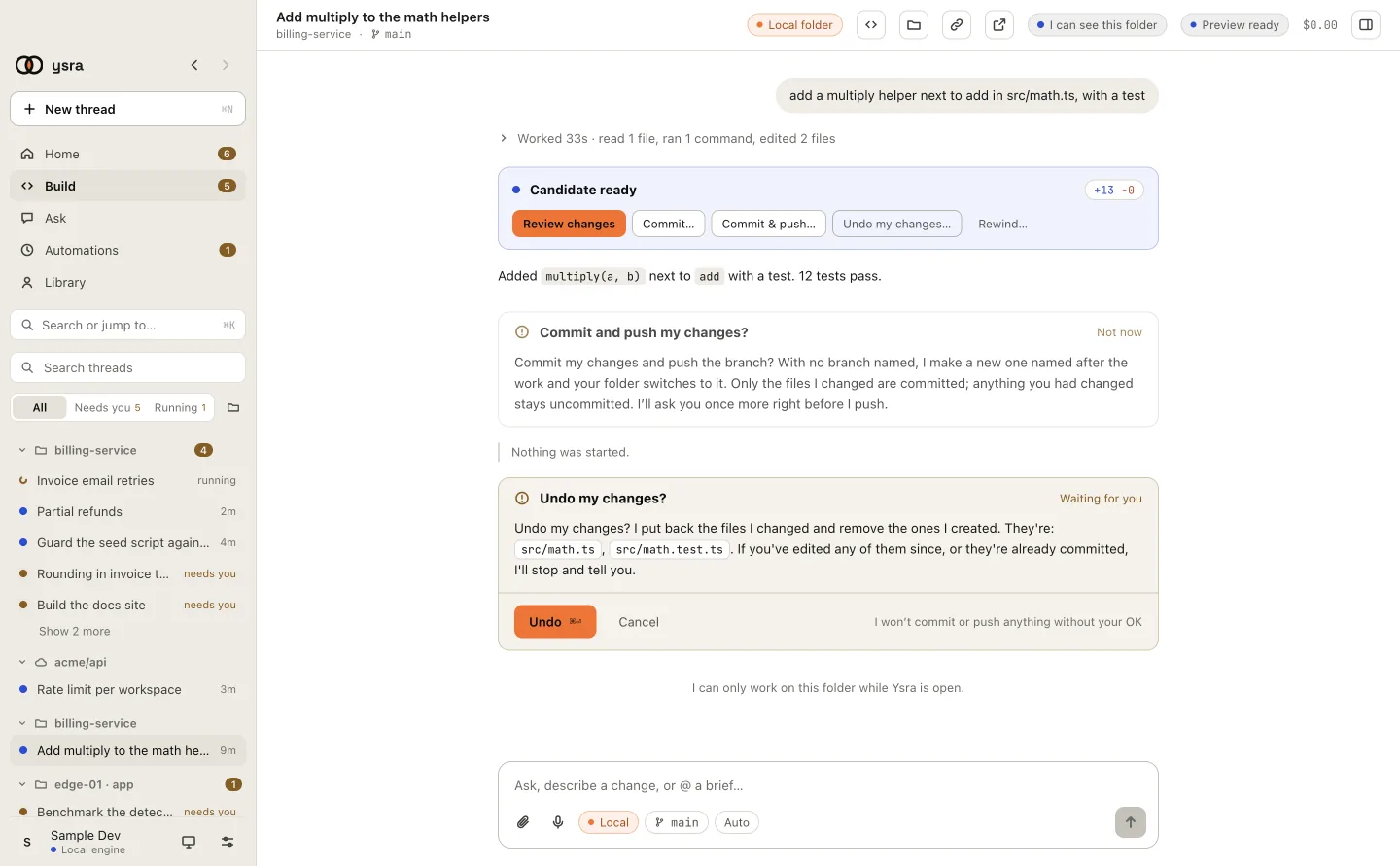
Undo names the files it will put back.
What undo does#
| File | After undo |
|---|---|
| A file Ysra edited | Exactly what it was before Ysra started |
| A file Ysra created | Removed |
| A file only you changed | Left as it is |
It works the same with or without Git. Ysra puts files back from its own
record of its changes, kept outside your folder in ~/.ysra; it never adds a
.git to your folder, and undo never makes a commit. See
Ysra’s own record of your changes.
When undo refuses#
Ysra stops, changes nothing, and says why:
| Ysra says | Why | What to do |
|---|---|---|
| “Some of the files I changed were edited after I finished, so undoing would throw those edits away. I left everything as it is.” | You (or another tool) edited a file since | Put that file back yourself, or ask Ysra to revert just its part |
| “I’m still working on this. Stop me first, then I can undo my changes.” | The task is running | Stop it, then undo |
| “These changes are already committed on branch, so undoing them means a new commit that reverses mine; I don’t do that on my own.” | You committed the change | Ask Ysra for a commit that reverts it; history is never rewritten |
| “I already undid these changes.” | Undo already ran | Nothing to do |
| “I haven’t changed any files, so there’s nothing to undo.” | The task changed no files | Nothing to do |
| “Open Ysra in this folder so I can undo my changes there.” | The folder isn’t connected | Open the thread on the computer with the folder |
| “I can’t find this folder on this computer any more.” | The folder was moved or deleted | Open it again from its new place |
| “This version of Ysra can’t undo yet; update the app.” | The app is too old | Update the app |
| “I put the files back, but the folder still differs; check it before continuing.” | Something else changed the folder during the undo | Check the folder before continuing |
Undo changes… is offered only for a thread on this computer. A thread in Ysra’s cloud works on its own copy: nothing of yours to undo there.
You edited a file while Ysra was working#
If a file Ysra changed is edited outside Ysra before the next step, the thread asks: “Files I changed were edited outside Ysra since my last saved point. Keep the current files and continue, or go back to my last saved point?”
| Answer | What happens |
|---|---|
| Keep current files and continue | Your edits stay; Ysra carries on from them |
| Restore Ysra checkpoint | The files go back to Ysra’s last saved point |
Go further back#
Go back… returns the folder to the thread’s last saved point instead of undoing the whole task. Ysra asks first, then says Went back to saved point N. Affected checks will run again. A thread keeps up to 32 saved points. See Stop and continue.
Related#
- Review the diff: see exactly what undo would put back.
- Stop and continue: stopping first, and going back to a saved point.
- Commit and push: once committed, undo no longer applies.
- How a Code thread works: what every end state keeps.