Delivery and deployment
What happens to a finished candidate — keep it, commit it, push a branch or open a pull request — and how going live on your hosting works as its own authorised step.
On this page
A finished session doesn't change your repository. Delivery — getting the candidate into your repository — and deployment — putting it live — are separate steps, each with its own permission.
Four states that never blur#
A session's summary keeps four questions apart:
| Question | Possible answers |
|---|---|
| Is Ysra still working? | Working, repairing, waiting to continue, finished. |
| Is there a candidate? | Yes — with its version — or not yet. |
| Is it verified? | Verified, completed, unverified, failed. |
| Has it been delivered? | Not yet, delivering, delivered, delivery failed. |
A session can be repairing while an earlier candidate is still available; a verified candidate can be undelivered; a delivered one keeps its review history.
Delivery options#
| Option | What happens |
|---|---|
| Keep only | The candidate stays in Ysra. You deliver it when you choose. The default. |
| Local commit | For work on a local checkout: a commit in your working copy. |
| Push branch | The candidate is pushed as a new branch. |
| Draft pull request | A branch plus a draft pull request, linked to the session's report. It is never merged automatically. |
Which of these happens automatically is set by your autonomy policy:
- Delivery — what happens to a candidate whose required checks passed.
- Unverified delivery — what may happen to one whose checks didn't all pass: keep only, or a draft pull request clearly marked as unverified.
When your policy doesn't deliver automatically, deliver by hand:
- Portal — Open PR in the workroom.
- Phone — Open PR in the output bar. Once opened it becomes PR #n.
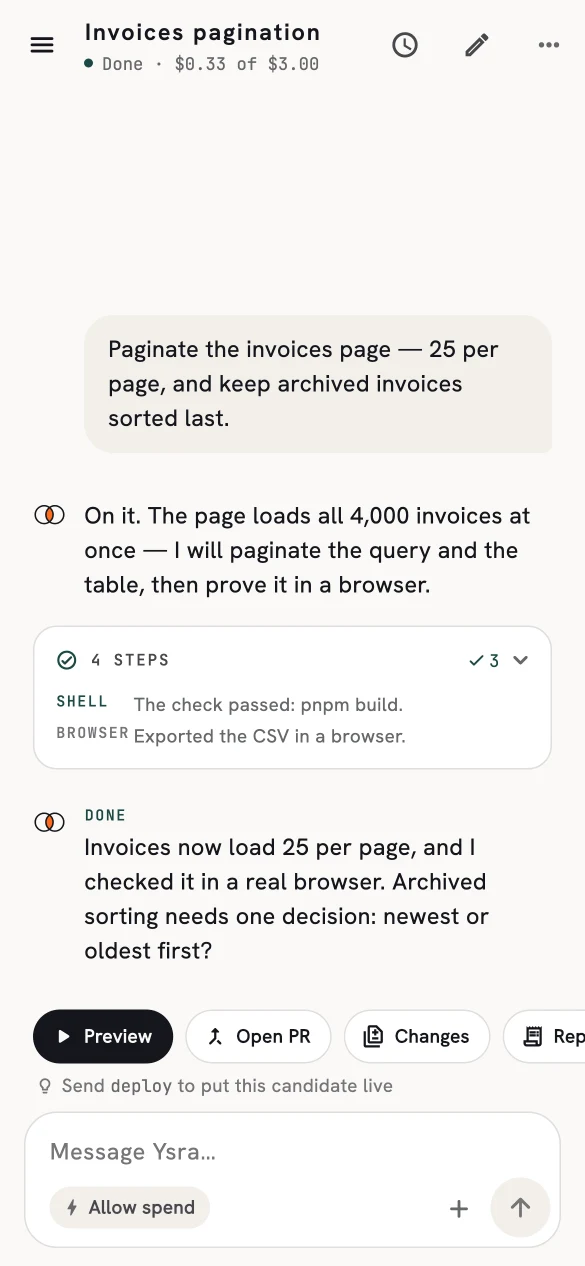
The output bar: Preview, Open PR, Changes, Report.
What delivery checks#
Before anything is pushed, the candidate is rebuilt from its checkpoint, checked against its recorded version, and scanned for secrets. Delivery permission is kept apart from the coding work: a repair step can never grant itself the right to publish.
Deploying#
Deploy puts a candidate live on hosting you have connected. It is its own flow, never an automatic last step of a coding session:
- Choose the candidate. Deployment names the exact version it will publish, and whether it is verified or not. Advisory findings stay visible.
- Choose the target — a preview environment or production.
- Review the plan. Ysra works out what the app needs — services, databases, environment settings — and shows the plan before creating anything.
- Deploy. Resources are created in order, the result is smoke-tested, and a domain can be attached as a separately authorised step.
- If something fails, the deployment can be repaired or rolled back. Resources Ysra didn't create are never touched.
Deploying is blocked while a coding task is still running. A failed deployment doesn't rewrite the session's verdict — it gets its own record and its own repair.
On the phone, sending deploy in a finished conversation starts the same flow.
Hosting connections
Deployments use hosting providers you connect in Account settings. Credentials stay with the platform; they never reach the model or the workspace.