Reports and sharing
The build report — one receipt for one candidate — what's in it, how to share it safely with people outside your workspace, and the audit record behind it.
On this page
Every session produces a build report: a single receipt for one candidate. It answers what was asked, what Ysra did, what was checked, what the browser saw, what review found — and, if it stopped, why.
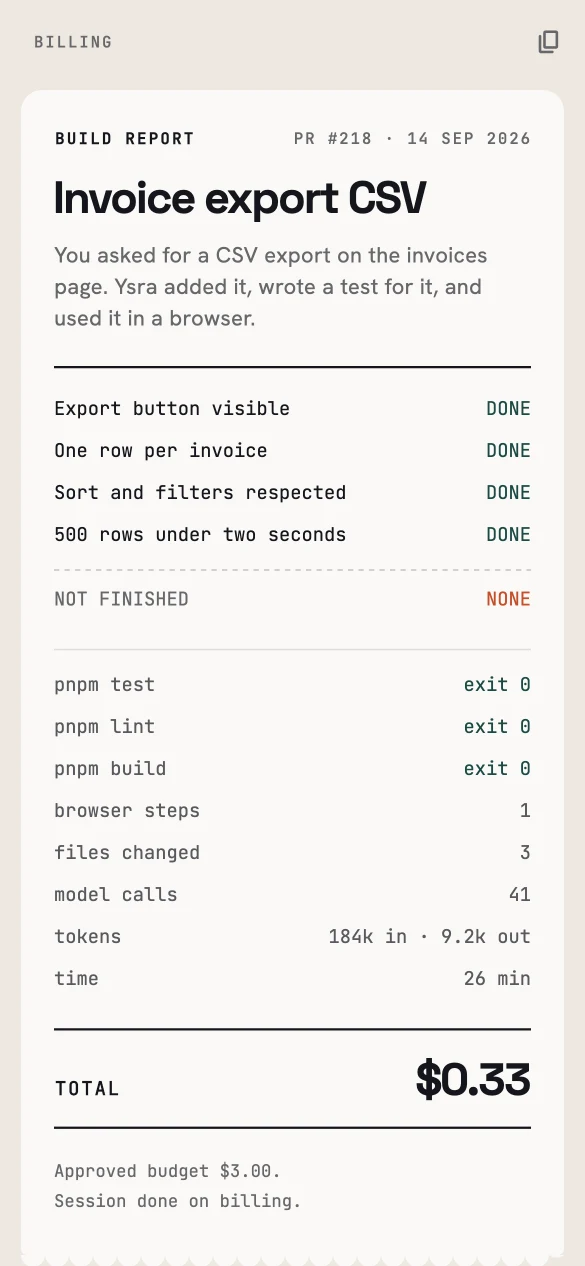
A build report: criteria, checks, effort and cost on one page.
What's in a report#
| Section | Contents |
|---|---|
| Summary | What you asked for and what Ysra did, in plain words. |
| Criteria | Each acceptance criterion with its result — done, not finished, unproven. |
| Checks | The commands that ran, with exit codes. |
| Browser | Browser steps and screenshots from executed workflows. |
| Review | Findings from acceptance and specialist review. |
| Effort | Files changed, calls, time. |
| Cost | Total spend against the approved budget. |
| Delivery | The branch or pull request, when there is one. |
Pull requests Ysra opens link back to the report.
Sharing a report#
Share a report with someone outside your workspace — a client, a reviewer — with a share link:
- Anyone with the link can read the report; they don't need an account.
- Screenshots are served separately, so a shared report never opens your private file storage.
- Revoke a link at any time from the report; it stops working immediately.
Asking about a result#
In the session, ask about the evidence directly — why did the type-check fail first?, which files touch billing? Ysra answers from the recorded evidence without doing new work or spending on changes.
The audit record#
Behind every report is a complete record of the session, visible in the Audit panel:
- events and steps, in order;
- model calls and tool activity, with timings and costs;
- artifacts such as screenshots and traces;
- delivery and deployment actions.
The record deliberately keeps what happened, not sensitive content: it doesn't store credentials, cookies, authorization headers, or internal model reasoning. Losing the audit export never changes a session's result.