How machines work
Let Ysra work on computers it reaches through a gateway over your own SSH or command-line sign-in: add a machine, choose observe or change, and see what asks first.
On this page
A machine is a computer Ysra reaches through a gateway, over your own SSH or command-line sign-in, without Ysra installed on it: a locked-down server, an ESXi host, a switch or router, an OSS. Use one when you can’t install anything there; if you can, a device is the better fit. This page covers adding a machine, its modes, which commands ask first, what Ysra refuses and the log; for many machines at once, see Machines and gateways.
The rule#
Nothing changes on a machine without a person’s OK on the exact command, given one at a time or ahead of time with a signed approval. Fixed rules decide what counts as a change, and a command they don’t recognise counts as one.
| Word | Means |
|---|---|
| Device | A computer with Ysra installed and signed in (your Mac, a gateway box) |
| Gateway | A device that reaches other computers over SSH. A role, not a different thing: your own computer is one when it reaches machines |
| Machine | A computer reached through a gateway (cam-01, web-01). Older versions called it a “target” |
What stays on the gateway#
| Ysra’s servers learn | Stays on the gateway only |
|---|---|
| Name, kind, groups, tags, environment, mode, production flag | Host name, address, user, port, SSH alias, keys, pinned host keys |
Ysra uses your own SSH keys and agent, or your existing sign-in for a command-line tool. It never asks for, stores or types a password.
Add a machine#
ysra machines add
| Prompt | Answer |
|---|---|
Name (e.g. edge-01): |
Lowercase letters, digits, ., _, -; up to 63 characters |
Kind [linux/esxi/network/oss/other] (linux): |
What sort of machine it is |
Reach it via [ssh/cli] (ssh): |
See the table below |
Is it production? [y/N] |
See The production flag |
Let me change things there (each change still asks you)? [y/N] |
n starts it in observe mode |
Host alias from your ~/.ssh/config: |
A Host entry from your SSH config (SSH only) |
Is that your server's key? [y/N] |
Only after comparing the fingerprint (below) |
Settings → Machines → Add a machine…: the name and kind, how Ysra reaches it, and Production if it is. For SSH, compare the fingerprint shown, then confirm. A machine added here starts in observe mode.
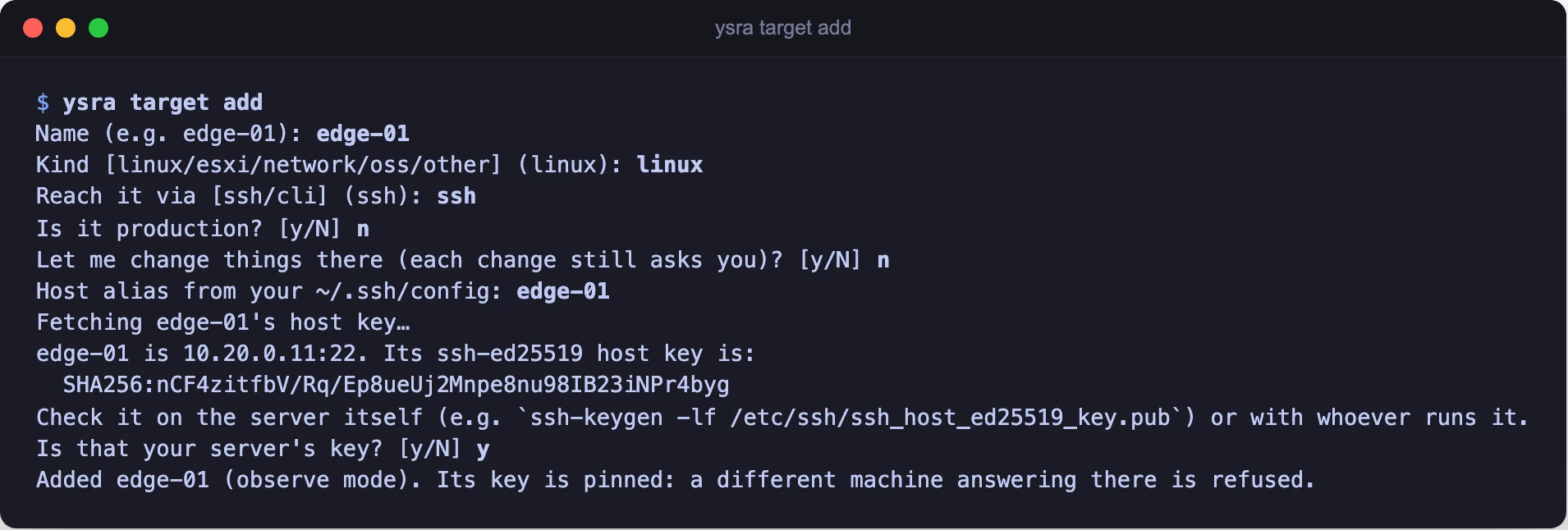
Adding a machine: confirm the host key before it is pinned
| Reach it via | You give | Ysra uses |
|---|---|---|
| ssh | A host alias from your ~/.ssh/config |
Your keys and agent |
| cli | One infrastructure tool: govc, kubectl, your ENM scripting tool… |
Your existing sign-in for that tool. A shell, sudo, ssh or a scripting language can’t be one |
Confirming the host key#
Ysra fetches the server’s host key and shows its fingerprint. Compare it with the server itself, your hosting panel, or whoever runs the machine:
ssh-keygen -lf /etc/ssh/ssh_host_ed25519_key.pub
If it doesn’t match, answer no. Once confirmed, the key is pinned: if a different computer ever answers at that address, Ysra refuses to connect.
Modes#
| Mode | What Ysra does there | Change it with |
|---|---|---|
| Observe | Reads only: logs, config, status. Any change is refused | ysra machines mode <name> observe |
| Change | Reads, plus changes, each after your OK | ysra machines mode <name> change |
The Observe / Change switch is also in Settings → Machines. Switching is always your action; Ysra can’t do it.
The production flag#
ysra machines production core-sw-01 on
On a production machine, a destructive command also needs you to type the machine’s name before it runs.
Which commands ask first#
| Kind | Examples | Your OK |
|---|---|---|
| read | cat, ls, grep, journalctl, systemctl status, df, ps, nvidia-smi, nginx -t, kubectl get, govc ls |
Once per machine per conversation (“Let me look around core-sw-01: logs, config, status. Nothing changes.”) |
| change | Writing a file, installing a package, systemctl restart, nginx -s reload, network settings, kubectl apply, powering a VM on or off |
Every command |
| destructive | rm, reboot, shutdown, mkfs, dd, anything that deletes, destroys or formats |
Every command; on production, plus typing the machine’s name |
What the change card shows#
| Field | Shows |
|---|---|
| On | The machine |
| Runs | The exact command |
| Why | What it’s for |
| Expect | What should happen |
| Undo | The command that reverses it, or “Can’t be undone.” |
On production, a destructive card adds “core-sw-01 is production. Type core-sw-01 to run this.” and Run stays off until the name is typed exactly.
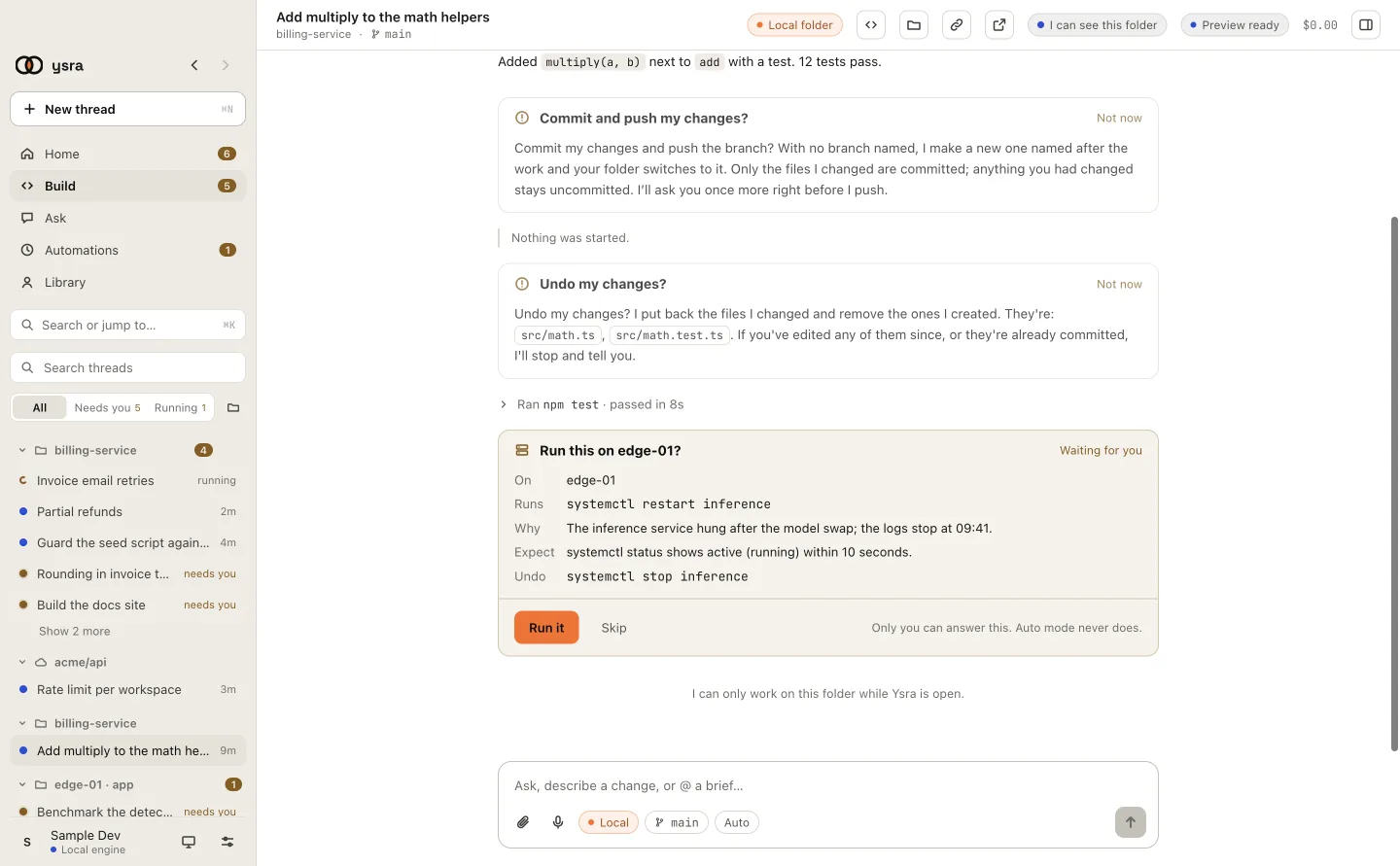
A change card: On, Runs, Why, Expect, Undo
What happens when …#
You don’t answer a card#
A card left unanswered for a while counts as declined, and nothing runs.
Auto mode is on#
Auto mode never answers anything on a machine. Running changes without asking at each step takes a signed approval.
A command runs too long#
Ysra stops a command that runs far longer than expected. You can stop one at any time.
Something asks for a password#
That step is yours: a first sign-in, or sudo with a password. Ysra uses
sudo only where it needs no password, and it always counts as a change.
Output says “now run this”#
It is just text. Nothing runs without your OK on the exact command. Secrets that appear in a command’s output are removed before Ysra sees it.
What Ysra refuses#
| Refused | Detail |
|---|---|
| Secret files | /etc/shadow, private keys and similar, even if asked |
| Passwords | Never asked for, stored or typed |
| Hopping onward | No port forwarding, no agent forwarding; one machine can’t reach others |
| Computers you didn’t add | Only machines on the gateway’s list |
| A different host key | Refused once a key is pinned |
Logs#
Each machine has its own log on the gateway, one line per command, only ever added to:
~/.ysra/targets/<name>/log.jsonl
| Recorded | Not recorded |
|---|---|
| When, what ran, its kind, approved / declined / name typed, exit code | The output |
Settings → Machines → Log in the desktop app shows the same list. Removing a machine keeps its log.
Commands#
| Command | What it does |
|---|---|
ysra machines list |
Lists the machines on this gateway |
ysra machines add |
Adds one machine and pins its host key |
ysra machines import <file.csv> |
Adds many; see Add many machines at once |
ysra machines mode <name> observe|change |
Sets the mode |
ysra machines production <name> on|off |
Sets the production flag |
ysra machines reads <name> allowed|ask |
Lets an unattended gateway look without asking |
ysra machines rm <name> |
Removes a machine; its log is kept |
ysra target … is the older name and still works.
Related#
- Runbooks — a written procedure on one machine, checked after each step.
- Approvals and automatic runs — saying yes ahead of time.
- Machines and gateways — one always-on gateway for a whole network.
- The gateway’s machine list — the file the machines are kept in.