How runbooks work
Run a multi-step procedure on a machine with a runbook: plan, dry run, one approved step at a time with a check after each.
On this page
A runbook is a procedure of several steps that Ysra carries out on one machine, with a check after every step. Use one when order matters and a mistake halfway would leave the machine broken: an upgrade procedure (a MOP), a configuration change with a verify step, creating several VMs. This page covers the stages, what asks first, and what happens when something goes wrong; for running one on many machines or unattended, see Approvals and automatic runs.
The rule#
A runbook never runs ahead. Nothing runs before you approve the plan, nothing changes before the dry run passes, and each step starts only when the previous step’s check showed what it must. At the first failure it stops and shows that step’s If it fails text; it never improvises a fix.
Runs on its own vs asks first#
| Part | Asks first? |
|---|---|
| The plan | Yes: approve or cancel. Cancelling means nothing ran |
| Starting checks and the dry run | Only the one “look” OK per machine per conversation (they are reads) |
| Each change step | Yes, every step, on the exact command. Approving the plan doesn’t approve the steps |
| A destructive step on production | Yes, plus typing the machine’s name |
| Each step’s check | No: always read-only. A plan whose check would change something is refused before you see it |
| The If it fails action after a failure | Yes: it is a change like any other |
| Auto mode | Never answers anything in a runbook |
| An automatic or scheduled run | Steps run under a signed approval; without one, only the dry run |
States#
| Stage | What it means | What moves it on |
|---|---|---|
| Plan | The card lists starting checks and every step; nothing has run | You approve, or cancel |
| Dry run | Starting checks run and each step’s check runs once; nothing changes | All pass → the steps start; any fails → stop, nothing changed |
| Step, then check | One approved command, then its read-only check | The check shows what it must → next step |
| Stopped at a failure | A step or its check failed; the next step doesn’t run | You act (below) |
| Done | Every step ran and every check passed | — |
Ask for a runbook#
There is no runbook file to write. You need the server added as a machine (see Add a machine) and in Change mode. Then ask in a thread, in plain words or with your procedure attached:
› On web-01, change version=1 to version=2 in /etc/app/app.conf as a runbook:
  back it up first, then edit, and check each step.
› @MOP-upgrade-core-sw-01.md Run this on core-sw-01.
To change the plan before approving, reply: “add a step to restart the queue service”. Ysra shows the new plan.
What the plan card shows#
| Part | For each item |
|---|---|
| Starting checks | A read-only command, what it must show, and why |
| Steps, in order | The exact command; its kind (read, change or destructive, by fixed rules); the check after it; what the check must show (an exit code, or text it must contain); what to do if it fails |
Runbook: upgrade app.conf to v2 on web-01

Before anything changes, I check:
  $ grep version= /etc/app/app.conf → prints "version=1"   (this upgrade is from v1)
  $ systemctl is-active app         → exits 0 and prints "active"

Then:
1. cp /etc/app/app.conf /etc/app/app.conf.bak                    change
   then checks  test -f /etc/app/app.conf.bak                    → exits 0
2. sed -i 's/version=1/version=2/' /etc/app/app.conf             change
   then checks  grep version= /etc/app/app.conf                  → prints "version=2"
   if it fails: cp /etc/app/app.conf.bak /etc/app/app.conf
3. systemctl restart app                                         change
   then checks  systemctl is-active app                          → prints "active"
   if it fails: cp /etc/app/app.conf.bak /etc/app/app.conf && systemctl restart app
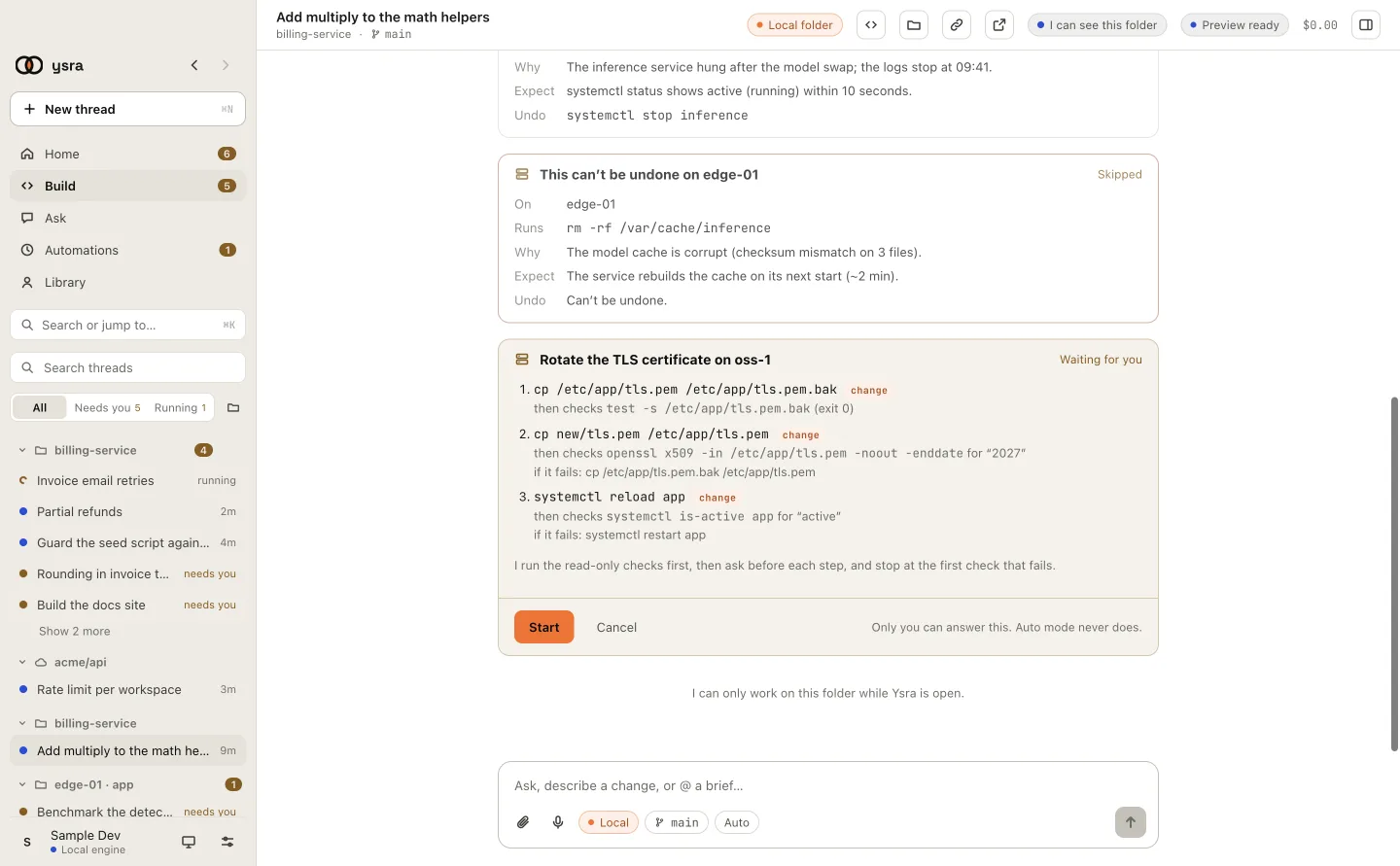
A plan card in the desktop app, before anything runs.
What happens when …#
The dry run fails#
Ysra stops before a single change and says why. A step’s check describes the state after its step, so in the dry run only “it runs here” is checked.
| Result | The thread says |
|---|---|
| All pass | Dry run passed: 2 starting checks met, every step’s check runs here. |
| A starting check shows something else | Dry run stopped before any change: starting check 1 (…) didn’t show what this runbook expects (…). It returned: version=3. Nothing was changed. |
| A step’s check can’t run | Dry run stopped before any change: step 3’s check (…) can’t run on web-01. Nothing was changed. |
A step or its check fails#
Ysra stops there, doesn’t run the next step, and shows which step, what the check returned, and that step’s If it fails text.
| You can | What happens |
|---|---|
| Ask Ysra to do what If it fails says | A change like any other: it asks first |
| Fix the cause yourself, then “resume from step 3” | A new plan with a new dry run; you approve again |
| Leave it | Steps already done stay done |
You ignore or decline a step’s card#
An approval card nobody answers counts as declined. Either way the runbook stops there; steps already done stay done, and Ysra shows the If it fails text for where it stopped.
The machine goes offline#
A command that can’t reach the machine fails, so the runbook stops at that
step like any other failure; nothing after it runs. In an automatic run the
machine ends Not answering and the others carry on. If the gateway itself
isn’t connected, nothing starts: “gateway isn’t connected right now. Run
ysra serve there.”
A vendor’s rules matter#
Where Ysra doesn’t know them, it says so. Attach the vendor’s document or your MOP, and Ysra works from it and cites it.
Examples#
| Procedure | How the runbook is built |
|---|---|
| A network MOP on a switch | Starting checks for the current firmware and BGP neighbours up; then save the config, load the image, reload, verify — each followed by its verify command, with the rollback next to each step |
| A configuration change on an OSS | Show the current configuration, validate the new one, apply, verify, with the restore command ready before applying |
| Creating VMs on ESXi | A starting check reads the inventory; one VM per step, each checked to exist and be powered on, skipping any that already exist |
You don’t need a runbook for a single command (“restart nginx on web-01”) or for looking around (“show me the disk usage”).
Limits#
| Limit | Value |
|---|---|
| Machines per runbook | 1 (for several, use an automatic run) |
| Steps | 40 |
| Starting checks | 20 |
| Longest a runbook runs | 6 hours |
Reusing a runbook#
Keep your MOP document and attach it again: Ysra rebuilds the plan, with a fresh dry run, for the machine’s state today. To run it unattended overnight, choose Run… in the Machines panel, set When to On a schedule, and pick a signed approval that covers its steps.
Runbooks are for machines. On a device, Ysra works on the folder directly, and changes still ask you. Every command is written to the machine’s log, with who approved it and the result.
Related#
- How machines work — modes, approvals and what Ysra refuses.
- Approvals and automatic runs — many machines, schedules, and the fix loop.
- Add a server as a machine — in the desktop app.