Open a folder
Start a thread on a folder on your computer — what the trust sheet shows, folders with and without Git, parallel copies, and what the chips in a thread mean.
On this page
A thread belongs to one folder. The folder you pick is the folder I work on: nothing above it, and nothing next to it.
Open one#
- New thread in the sidebar, Cmd+N (Ctrl+N on Windows and Linux), or Cmd+O from anywhere.
- On macOS, drop a folder on the Ysra icon in the Dock.
- On Windows, right-click a folder and choose Open in Ysra.
I won't open a whole disk, your whole home folder, a system folder, or my own data folder. Pick the project folder inside it.
The trust sheet#
Before I read anything, I show what I found and ask.
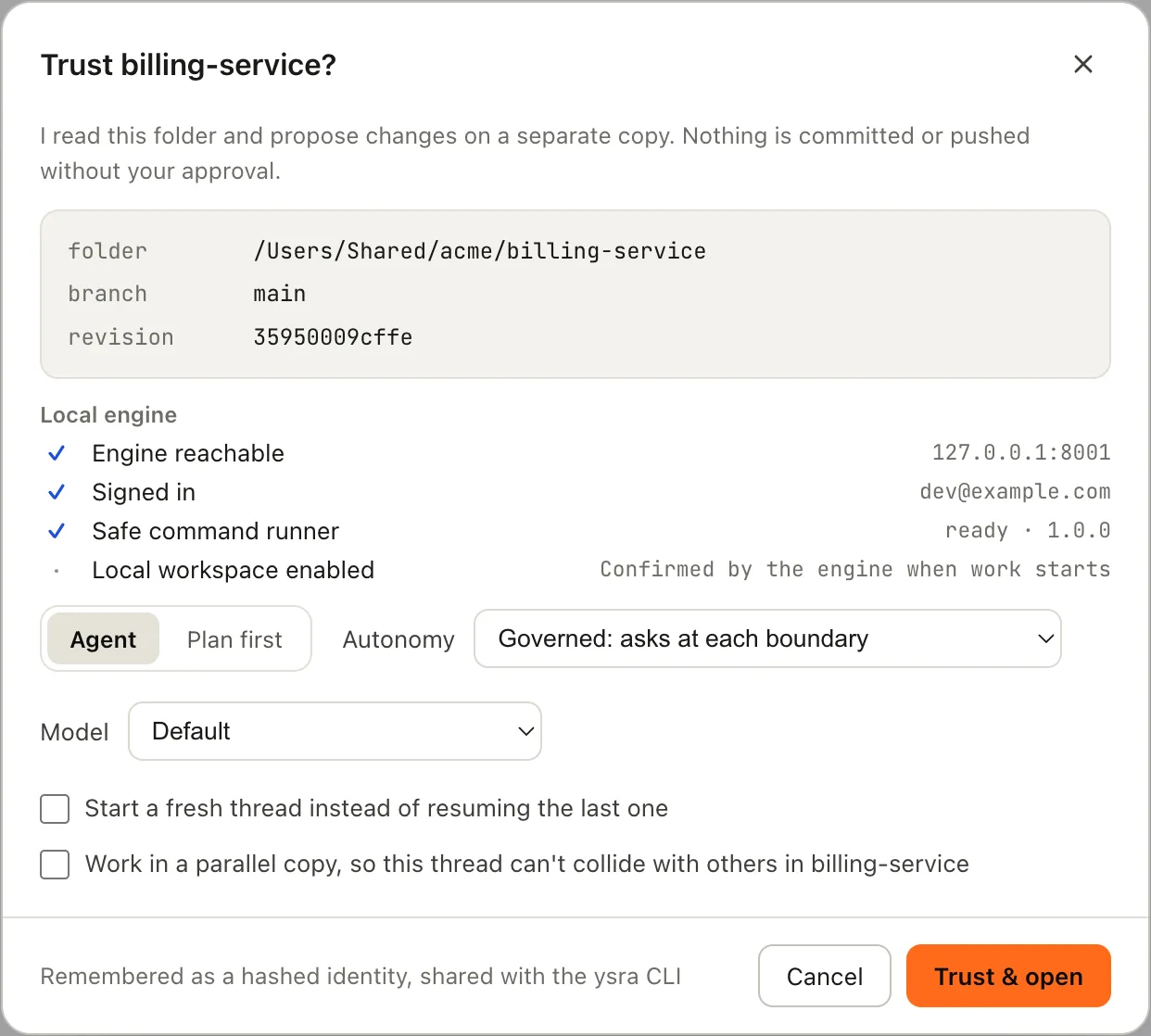
Trusting a folder before I read it.
| Row | Meaning |
|---|---|
| folder | Where it is on this computer |
| branch | The branch that is checked out |
| revision | The commit it is on |
| uncommitted | Files you have changed and not committed. I keep them read-only: I can read them, never overwrite them |
Then choose how to start:
| Option | What it does |
|---|---|
| Agent | I start on your first message |
| Plan first | Your first message becomes a written specification you approve before any code changes |
| Autonomy | Governed asks at each boundary. Max lets me go further and check my own work again |
| Start a fresh thread instead of resuming the last one | Otherwise I pick up the last conversation for this folder |
| Work in a parallel copy | Creates a branch ysra/<name> in its own folder under ~/.ysra/worktrees, so this thread can't collide with others on the same project. Your open folder is not touched |
Choose Trust & open. The folder is remembered as trusted on this computer, for the app and the CLI alike, so I don't ask again.
Folders without Git#
A folder without Git works. The sheet says:
not a Git folder: I keep my own record of changes outside it, and add nothing to it
Diff, review and undo all work the same way. Nothing is created inside your folder to make that possible.
A folder inside another repository#
If you open a subfolder of a larger repository, I work only in that subfolder:
not its own Git folder (it sits inside acme, which I leave alone): I keep my own
record of changes outside it, and add nothing to it
To commit to the repository, open the repository's own folder instead.
What the chips mean#
At the top of a thread:
| Chip | Meaning |
|---|---|
| Local folder | I work on this folder, on this computer |
| I can see this folder | The app is open and connected to the folder. While it's reconnecting it says so; I can't see this folder · retry reconnects when you click it |
| on edge-01 | The thread runs on a device; this computer only shows it |
| Running | I'm working |
| Docker: allowed for this session · Revoke | You allowed Docker for this thread. See Docker |
| Preview ready | There's a running version to look at. See Previews |
In the message box:
| Chip | Meaning |
|---|---|
| Local | This thread works on a folder on this computer |
| the branch name | The branch the folder is on |
| Auto | Auto mode for this thread. See Approvals and auto mode |
The app has to be open#
I can only work on a folder while Ysra is open on the computer that has it. If you close the app mid-task, I pause and pick up when you return. See Stop and continue.